
TYPO3 Documentation Now Renders to Markdown
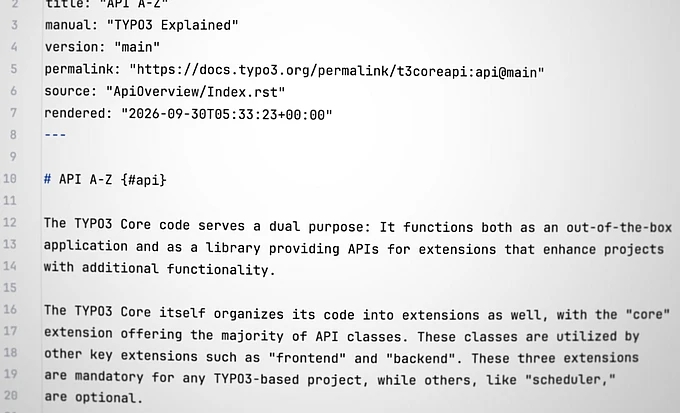
TYPO3 documentation is now available as Markdown, giving you the complete page at a fraction of the size, ready to download or hand to automated tools. New JSON files also make the Core Changelog searchable by PHP class ahead of a major update.

The Documentation Team is pleased to announce that TYPO3 documentation now renders to Markdown alongside HTML. When a manual is rendered, each page gets a Markdown version at the same URL, with .md instead of .html. This version contains the complete content, without navigation or markup, at a fraction of the size. Unlike the reStructuredText sources we have published for years, it is the finished page.
One URL Away
Take any documentation page URL and replace .html with .md. That is the whole convention. Every rendered page also announces its Markdown version in the HTML head as <link rel="alternate" type="text/markdown">.
Each Markdown file opens with a YAML header naming the manual, the version, the page's permalink, its source file, and when it was rendered. Its links are permalinks too, and every heading carries its anchor, so a file that has been downloaded still works and still says which version it describes.
To see the difference, compare the API overview in TYPO3 Explained with its Markdown version. The content is the same, but the HTML is 272KB and the Markdown is 73KB.
Better Than the Sources
reStructuredText pulls content in while a manual is built: an include:: brings in a file that is never published on its own, a directive generates a whole section from data that lives elsewhere. The reStructuredText source of the f:form.checkbox page in the Fluid ViewHelper Reference is 8.8 KB and does not list the ViewHelper's arguments, because that list is generated from a JSON description at build time. The Markdown version of the page lists all nine arguments.
The awkward part is that an incomplete source does not announce itself — 8.8 KB does not look like a stub. The Markdown removes the need for readers and tools to judge whether a source file is complete.
A Map of Every Manual
Reading a page is one half; knowing which page to read is the other. Every manual now also publishes a toc.json alongside its pages. This file is the manual’s table of contents in JSON format. It lists every page in reading order, nested the same way as the menu, with each page's title, anchor, and links to its HTML and Markdown versions. For TYPO3 Explained, toc.json is 568 KB, so a tool can map the manual without downloading the 4.2 MB inventory in objects.inv.json.
One more file answers a question nothing answered before, Where is this class explained? classes.json lists every PHP class a manual mentions, and where: in the text, in a code example, or where the class itself is documented. Each mention gives the page and an anchor, so its permalink leads to the passage itself rather than to the top of the page. It also lists any class members the text names, such as ::makeInstance(). This works for any manual rendered since the change.
The Changelog, for Everyone Updating a Project
Updating a project from one major TYPO3 version to the next starts with the Core Changelog: every breaking change, deprecation, feature, and important notice has its own entry. It is now published as JSON too, on Changelog-<major>.json file per major release since TYPO3 7.
Each entry has its permalink, title, kind of change, Forge issue, the release it belongs to, and tags (such as ext:core). A tool can read everything a release changed in a single request, instead of fetching each entry separately. Each entry also has a Markdown version, like any other page.
Each entry also lists the PHP classes it names, and which section mentions them. A class under Description or Impact is often the one that changes. A class under Migration is often what to use instead. So a question like Which Changelog entries deprecate TemplatePaths->fillDefaultsByPackageName(), and what replaces it? can be answered from these lists alone, for every release since TYPO3 7, whether or not that version is installed anywhere. A tool that checks the classes a project uses can then find every relevant entry before the update, rather than after.
For Automated Clients
docs.typo3.org/llms.txt, a file that tells AI tools how to use a website, now , now sets out the order in which to read a manual:
toc.jsonto learn what it covers- The Markdown, to read the pages
- Rendered HTML only where no Markdown is published yet
- The reStructuredText sources, as a last resort.
robots.txt permits every client, including AI crawlers listed by name, to fetch the Markdown, toc.json, the Changelog files, and the inventories. This means AI assistants and other tools can work from the complete documentation, instead of piecing it together from heavy HTML or incomplete sources.
The consolidated SingleHTML page that used to be published for each manual is gone; it disappears from every manual with its next render. If you have a manual's source files, you can still generate a single file on your own machine, as Markdown or as HTML:
docker run --rm -v $(pwd):/project ghcr.io/typo3-documentation/render-guides:latest \
  --single-markdown ./Documentation
--single-html instead to get one HTML page. docs.typo3.org no longer publishes either version.

Documentation Team
Our main goal is to provide comprehensive, relevant, up-to-date and easy to find documentation about TYPO3 products for all users.
Availability — Just Render it Again
A manual gets the Markdown and JSON output the next time it is rendered. TYPO3 Explained, the Core Changelog, the TypoScript Reference, Getting Started, and How to Document already have both. Some manuals, such as the Fluid ViewHelper Reference, have their Markdown but not yet the JSON files.
If you maintain a manual and want the new output, you don’t have to configure anything, just render it again.
