
Editors Choice: The Top 5 Editor-friendly Features in TYPO3 v14 LTS
Discover the top 5 editor-friendly features in TYPO3 v14 LTS. From a redesigned backend to smarter workflows and guided translations. Content editing made easier than ever.

Introduction
TYPO3 v14 was released to much fanfare at last year’s T3CON, when Benni Mack delivered the announcement and shared some of the most exciting features on stage. Since then, there have been several new releases as part of the v14 minor release cycle, culminating in the TYPO3 v14 LTS release on April 21, 2026.
The final chapter in v14 represents the latest step in producing the next generation of content management solutions that deliver cutting edge features to end users, enabling them to improve and scale their digital presence.
From an editor standpoint, v14 has been a significant step-up in terms of delivering a more powerful, efficient, and overall positive experience. Making content creation easier than ever before. In this blog post, we’ll look at some of the most editor-friendly features v14 has to offer, and explore how any editor can benefit from the latest in TYPO3 technology.
What is TYPO3 v14 LTS?
TYPO3 v14 LTS is the latest Long-Term Support (LTS) release from TYPO3. It delivers a modern content management foundation featuring unmatched flexibility, scalability, and security and comes with top-tier editor-friendly features.
Like any TYPO3 release, TYPO3 v14 LTS comes with three years of free support and maintenance, including security updates and bug fixes, ensuring organizations who choose it remain secure and high-performing.
Is TYPO3 v14 LTS a Major Change for Editors?
TYPO3 v14 is undoubtedly the most editor-centric version release from the open source content management leader. It comes with an array of out-of-the-box features made specifically with the editor experience in mind, and delivers newfound flexibility to editors looking to make the most out of their use of the platform.
From a modernized backend and intuitive navigation, to easier page creation and context aware editing, along with improvements to page translation workflows, TYPO3 v14 delivers real value to editors, and allows them to improve their organization's digital presence.
The Top 5 TYPO3 v14 Features for Editors
The TYPO3 editor experience has received a major revamp with a number of impactful new changes and additions. Let’s get into which features in TYPO3 v14 LTS make editors' lives easier than ever.
A Fully Modernized Backend UI
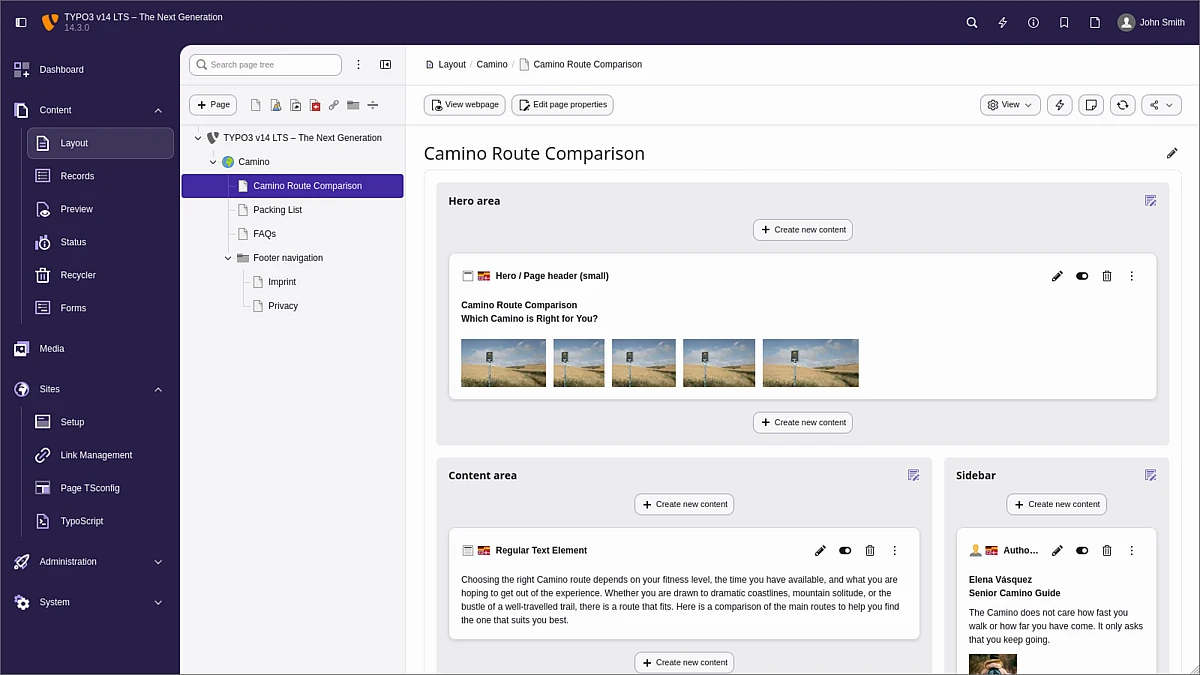
The new TYPO3 backend interface delivers a cleaner, more modern, and deeply intuitive experience for users. The redesigned structure means easier navigation, and the new look and feel sets it at the forefront of modern CMS backend interface design.
Updated module names make finding what you’re looking for easier than before, and the addition of a breadcrumb navigation feature matched with a cleaner layout is a major upgrade in the editor experience.
The result is a more efficient workflow that saves editors time searching for modules and allows them to focus on creating new pages and content.
Context Aware Editing
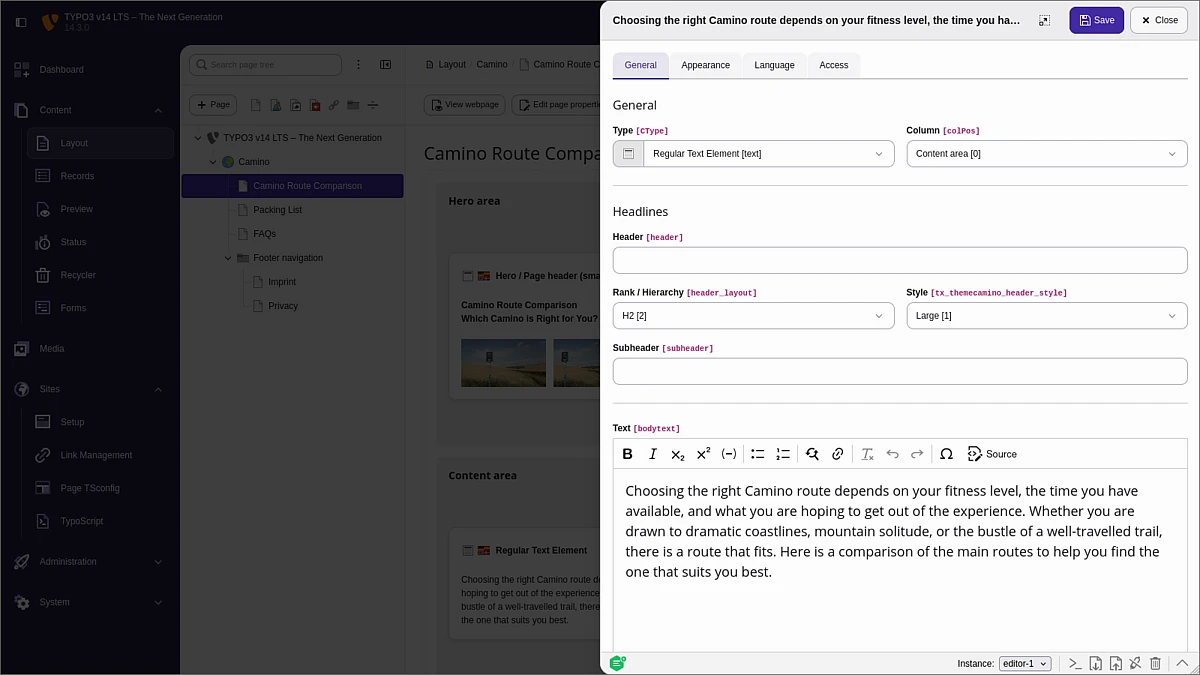
Another important feature is the new context panel and context aware editing. When using v14, editors will benefit from a context panel that appears from the right whenever a content element is being adjusted.
The form opens with the panel while the page layout remains in the background, meaning editors don’t have to move away from the page they’re working on, reducing the need for additional navigation, and once again, saving time and delivering added efficiency.
Guided Translation For Multilingual Sites
The new guided translation workflow simplifies the process of managing multilingual content. This is part of a larger focus on delivering a more intuitive and efficient approach to multilingual site management.
The new translation wizard guides editors through the entire process, skipping unnecessary steps and delivering a consistent experience that enables accurate translations. The system is also easy to add extensions to, in cases where an organization is already using a third-party translation tool. This includes AI-powered tools, which offer editors unprecedented flexibility and scalability for their multilingual site management operations.
Easier Page Creation and Content Workflows
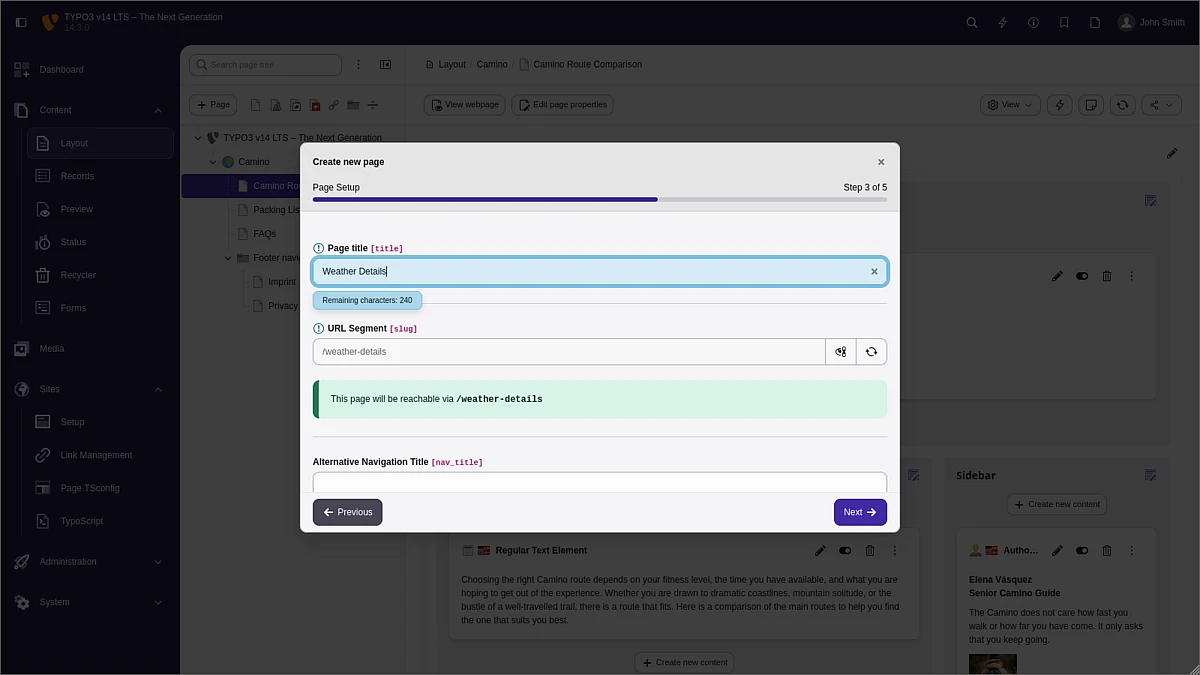
TYPO3 v14 introduces a page creation wizard and more intuitive workflows. These additions help editors structure content more efficiently. By making the process guided, editing becomes not just easier, but also more consistent and less prone to errors.
The page creation wizard is ideally suited for new editors who are familiarizing themselves with the TYPO3 backend architecture, as well as team members on larger-scale projects in complex structures who want to build pages in line with organizational standards.
Camino - Introducing the TYPO3 Default Theme
Camino marks a major addition to the TYPO3 feature offering. The first-of-its-kind in TYPO3 default theme allows teams to launch new websites in a matter of minutes. Camino is fully self-contained, meaning that it doesn’t have any third-party dependencies, and it offers editors a clean, flexible, and easy to edit frontend output for them to put their creativity on display and immediately start connecting with their audience.
The new theme features several color and style variations, meaning that editors can pick and choose from a wide range of options to bring their brand to life.

Conclusion
TYPO3 v14 LTS signifies the next generation of digital platforms editors can utilize to create scalable, secure, and high-performing websites that meet the needs of their organization and deliver value to their customers.
The wide range of editor-centric features that v14 comes with enable easier content creation, more accurate translations, and an intuitive design that allows for newfound efficiency when creating content.
That's not all. In our next blog post, we'll be covering the hidden gems that might fly under the radar, but which make v14 an even more powerful tool for editors.
