
TYPO3 v14.2—Refined Where It Matters
Today we proudly released TYPO3 version 14.2—and you won't be disappointed! You'll find new features, improvements, and optimizations in every corner of the system. Read on to learn more about what's new in the last sprint release before the v14 LTS launch in April 2026.

The TYPO3 Core team has been working at full pace over the past months to bring the TYPO3 v14 release to life, delivering an impressive set of new features and improvements. This achievement is backed by a passionate global community of developers and contributors whose expertise and dedication made this release possible.
As we enter the final stretch, the focus now turns to testing, fine-tuning, and polishing every detail to ensure a smooth and stable LTS release in April that will delight the TYPO3 community and satisfy end users.
TYPO3 version 14.2 introduces a context panel making page editing smoother and more efficient. The modernized backend UI also features a page creation wizard and comes with a new module to create short URLs in seconds. We’ve also added a whole range of new features to Form Framework and made loads of improvements under the hood.
Let’s take a closer look at these and other enhancements included in the new release. For deeper technical insights, please refer to the detailed v14.2 changelog.
Key Changes in TYPO3 Version 14.2
Content and Page Editing Made Easy
Editing content and configuring page properties are part of the daily routine for TYPO3 backend editors. Once a user selects a page in the page tree, the content area on the right displays the page’s content. Clicking a content element reloads this area and opens the editing interface for that element—until now.
With TYPO3 14.2, this workflow becomes faster and more streamlined. Instead of reloading the entire content area, a context panel now slides in from the right whenever a user edits a content element or the page properties. The editing form appears within this panel, while the page layout remains visible in the background. This keeps users in context, reduces unnecessary navigation, and makes everyday editing more efficient.
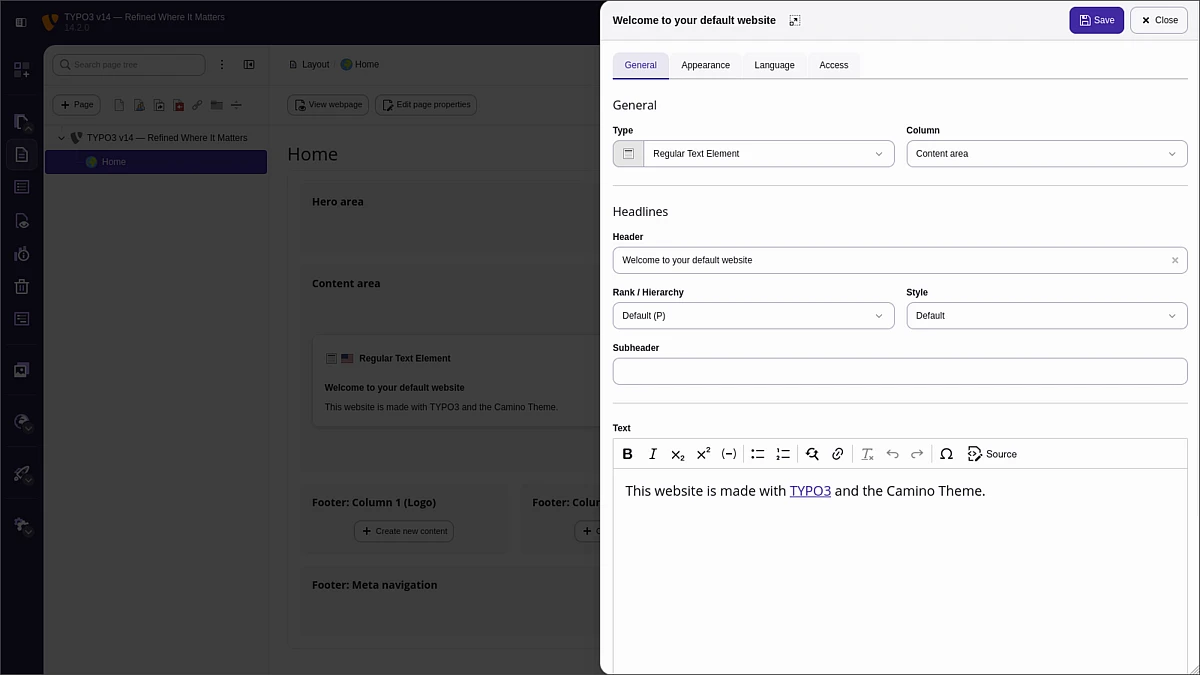
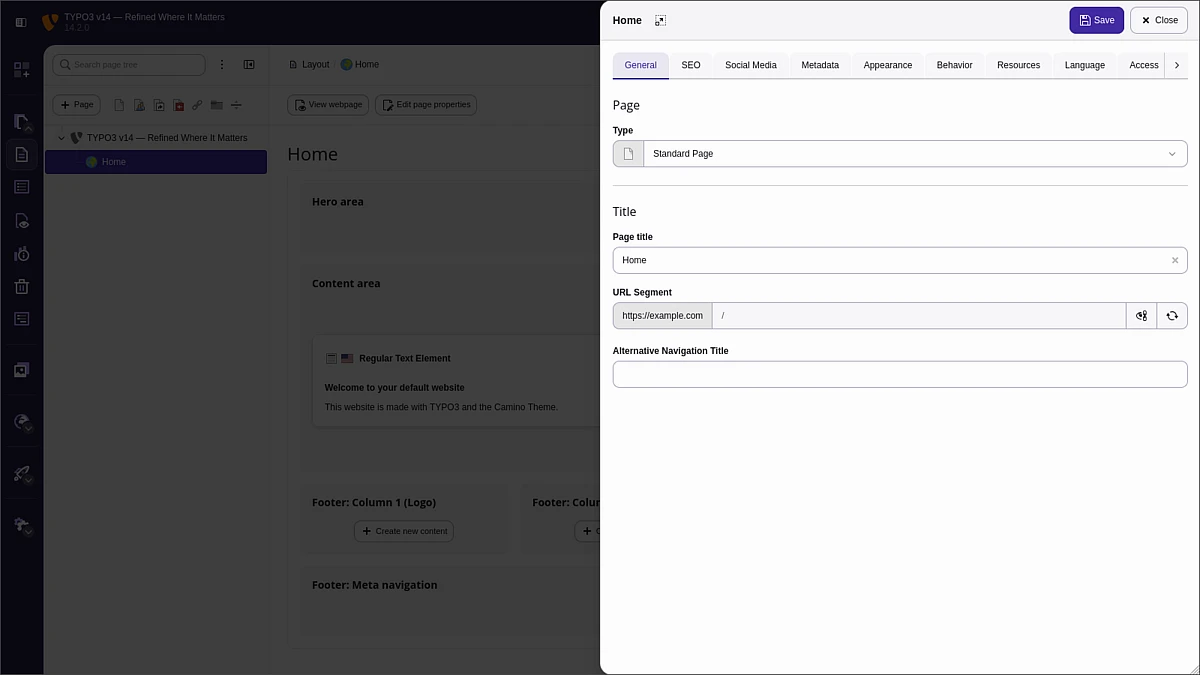
Backend users who prefer the traditional workflow, or who need more space for complex editing tasks, can switch to the full editing view with a single click on the icon at the top of the context panel. For those who want to opt out entirely, the slide-in panels can be disabled in the user settings using the “Use quick editing for records in the page module” toggle.
Page Creation, Streamlined
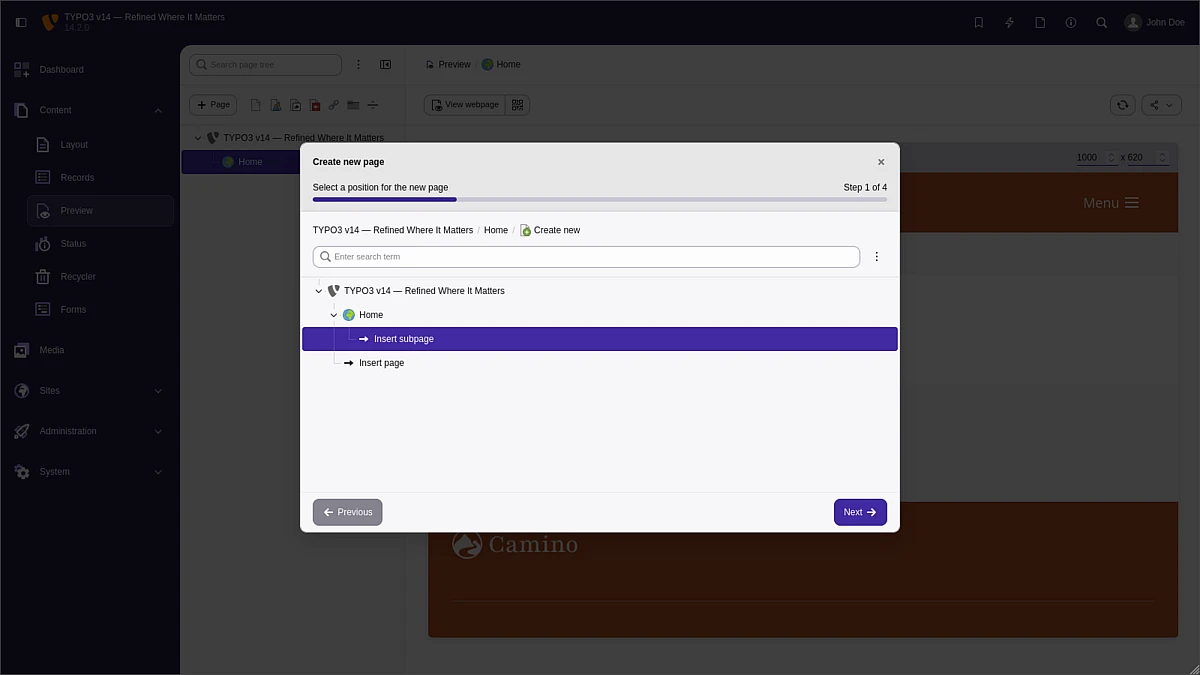
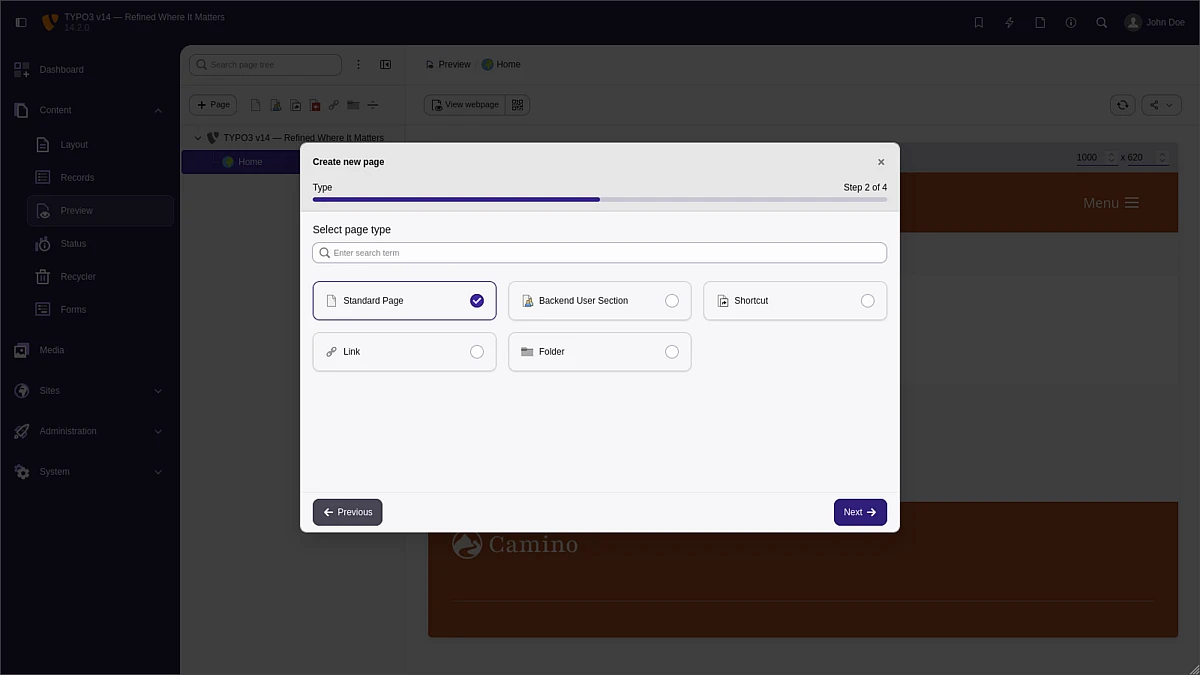
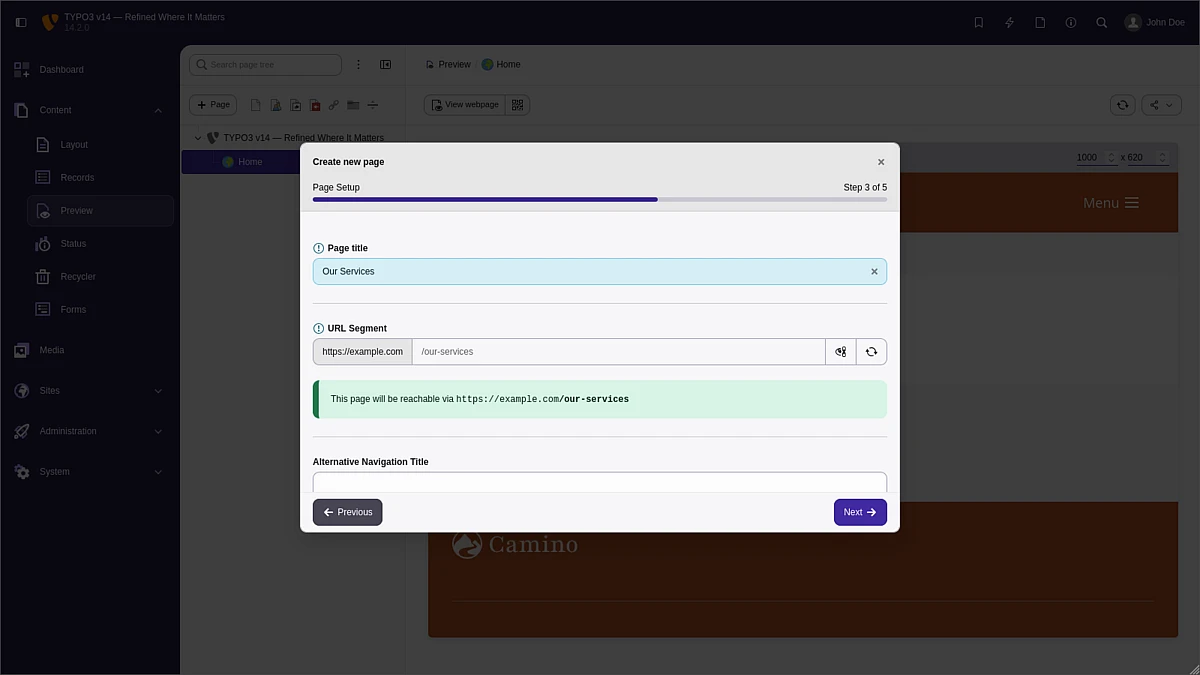
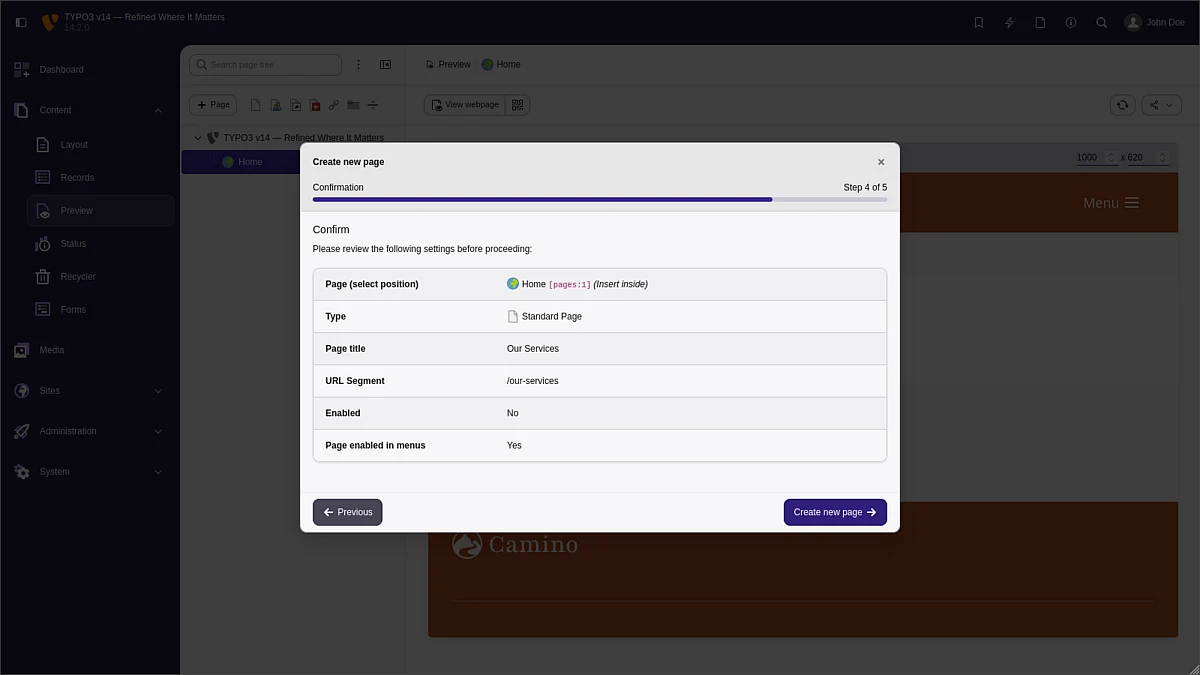
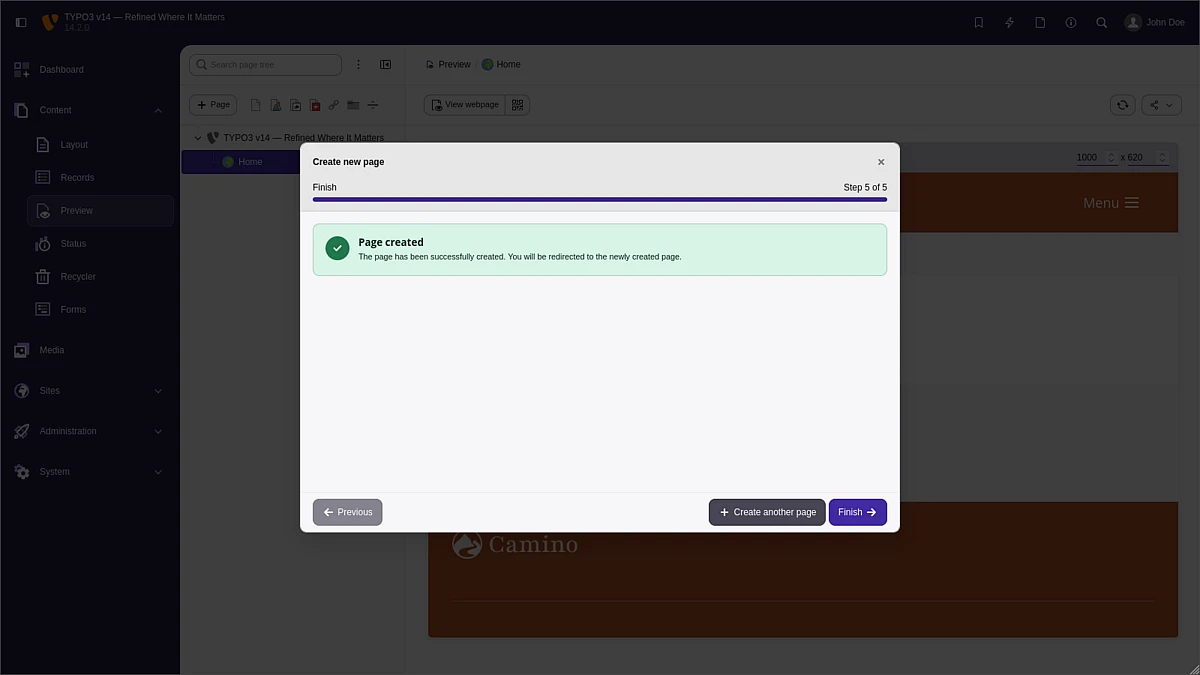
Creating new pages in TYPO3 14.2 is now more intuitive and reliable, thanks to the improved page creation wizard. Editors are guided step by step through the process and can place new pages exactly where they belong in the page tree. At the same time, all relevant input fields remain visible, helping users complete the setup with confidence and reducing the chance of missing required information. This is particularly useful for more specific page types such as news pages, where additional settings often play a key role during creation.
Short URLs
Remember the QR Codes module we introduced in Sites → Link Management in the previous sprint release? TYPO3 14.2 expands this area with another addition designed to support marketing teams: a new module for managing short URLs.
The module provides an intuitive workflow to create and manage persistent short URLs that point to selected pages. Once created, these URLs remain fixed, with built-in safeguards preventing duplicates and unintended changes.
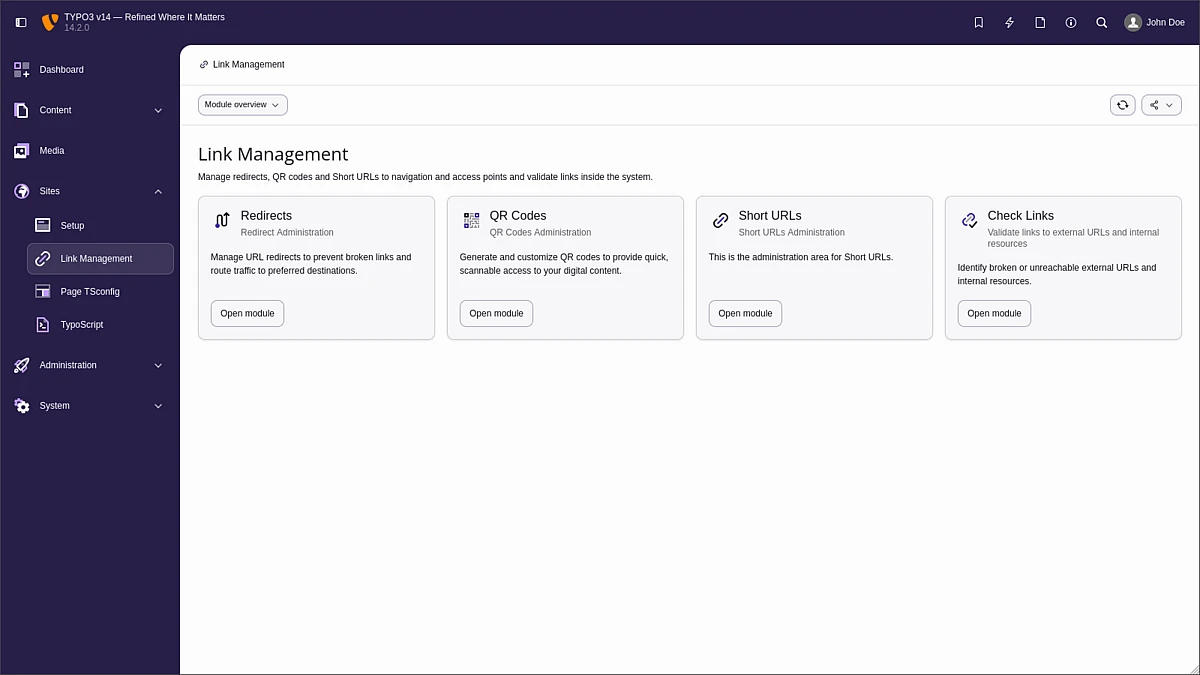
submodules
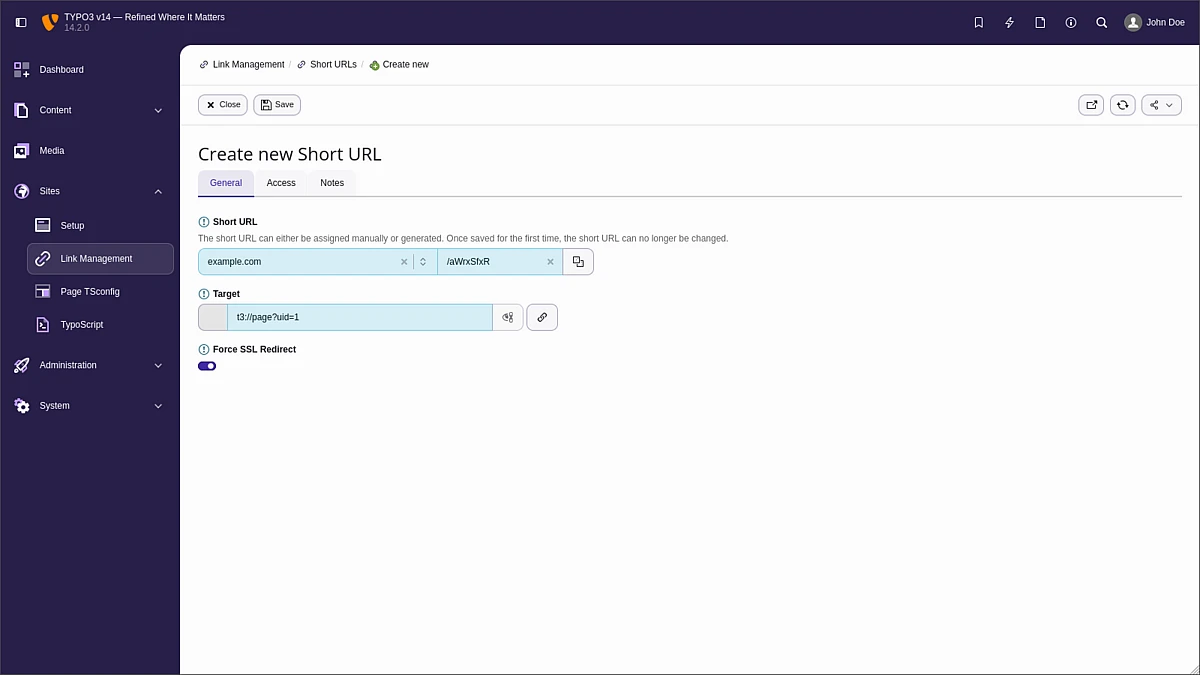

Similar to the QR Codes feature, short URLs come with practical options such as hit counters, enforced SSL, and expiry dates. Together, these features make it easy to manage campaigns with confidence and control.
Further Backend Improvements
Centralized Bookmark Management
Although bookmarks (referred to as “shortcuts” in older terminology) are not new in TYPO3, they are extremely valuable in large-scale TYPO3 instances with complex page trees where hierarchy depth can significantly slow down routine tasks.
Backend users maintain their own set of bookmarks, allowing them to tailor the interface to their roles and responsibilities. For activities performed regularly, such as updating a news section, having fixed entry points reduces the likelihood of navigation errors and ensures users always operate on the correct records.
The bookmark toolbar item in TYPO3 v14 now opens a dropdown with quick access to recent bookmarks and a link to the new Bookmark Manager.
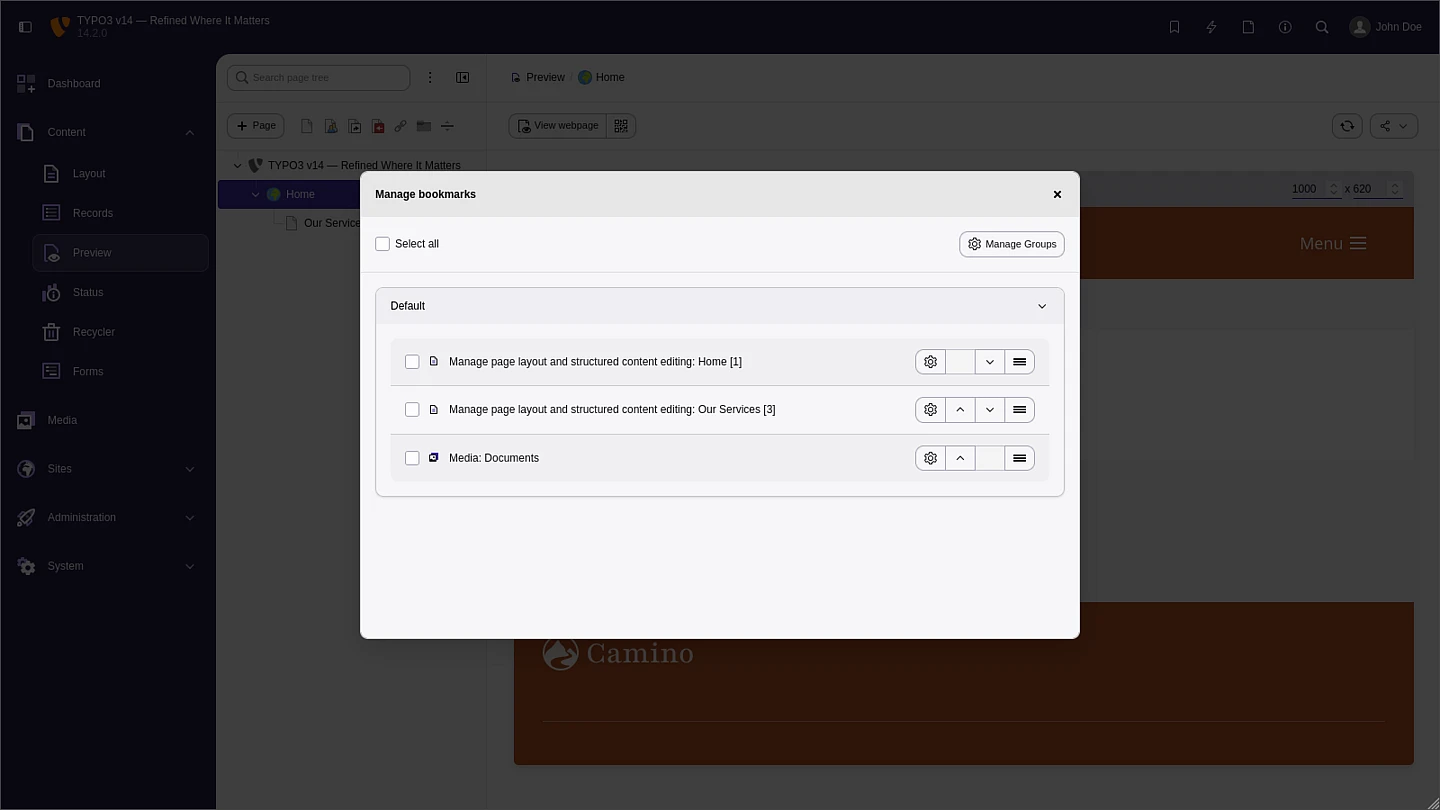
Users can organize their bookmarks in groups and administrators can configure global bookmarks visible to all users. We also updated the related dashboard widget to support the new bookmark system.
Forms to a New Level
Forms are one of the primary input mechanisms on the web. They allow website owners to collect data from visitors and logged-in users through surveys, polls, feedback forms, and contact requests.
In TYPO3 14.2, the Form Framework receives a wide range of improvements, both large and small, elevating it to a new level for the LTS release.
A common requirement in many forms is file uploads, whether for job applications, competition entries, or event registrations. Editors and integrators can now enable multiple file uploads within a single form field, removing the need to configure a fixed number of upload elements.
Once a form is submitted, so-called form finishers handle follow-up actions such as storing data in the database or sending notification emails to users and staff. Custom messages for these emails can now be configured directly in the TYPO3 backend, giving editors more flexibility without requiring HTML or Fluid knowledge.
The Form Framework also introduces rich text editing for text area fields using CKEditor 5. This allows editors to format and style content directly within forms, and ensures a consistent editing experience across the TYPO3 backend.
The form editor itself has been enhanced as well. The tree view on the left, which represents the full form workflow and all associated elements, is now built on a modern Web Components architecture, aligned with the page and file tree technology in TYPO3. This results in smoother interaction and adds useful capabilities such as search and a collapse-all function.
Since the Form Framework was introduced in TYPO3 v8, form definitions have been stored as YAML files in the file system. This approach is now deprecated in favour of storing definitions in the database. The new DatabaseStorageAdapter introduces a flexible way to work with multiple storage options. It supports an extendable chain of storage backends, including extension-based sources that are read-only.
To make the transition easier, TYPO3 v14.2 features the form:definition:transfer CLI command. It allows integrators to move form definitions between storages, making migration simple and efficient.
Further improvements include support for the ICU message format, enabling more advanced handling of plurals, variable interpolation, and other logic within translation labels. Date handling has also been improved with a new web component that provides a structured and user-friendly way to define default values and date ranges.
Finally, a new CLI command form:cleanup:uploads has been added to the TYPO3 Console. It allows integrators and administrators to safely clean up outdated upload folders created by the Form Framework, helping to free up disk space and keep installations well maintained.
TYPO3 Under the Hood
Let’s take a closer look at the technical updates and new features, especially for integrators and developers.
Content Type Usage Report
Administrators and developers need clear visibility into how content is used across a site. This includes spotting unused content element types and understanding which fields are actively used in each element. With these insights, teams can streamline their configurations, reduce complexity, and create a more efficient, maintainable setup.
The new reports module makes it easy to analyze and optimize content structures within TYPO3. It provides an overview of all content element types and shows how often each one appears across the site, including summaries by type.

submodules

of content elements usage
Keep in mind that TYPO3 offers multiple ways to include content elements, and some may be rendered through alternative methods like TypoScript or ViewHelpers. While the Content Statistics module gives a comprehensive overview, it has some technical limitations in tracking actual usage.
Fluid ViewHelpers
Three new ViewHelpers expand the rendering capabilities in TYPO3 and open up more flexible integration options.
As the name implies, the new RenderContentArea-ViewHelper is responsible for rendering content areas. In addition, it enables extensions to hook into the output via a PSR-14 EventListener. This makes it straightforward to inject debugging wrappers or enrich the generated markup with additional HTML structure.
A similar concept applies to the new RenderRecord-ViewHelper, which serves as a modern alternative to the widely used cObject ViewHelper. It aligns with current best practices and offers a more consistent approach to rendering records.
The third ViewHelper delivers a standardized and future-ready way to render text-based fields, including both plain text and rich text. By accepting the full database record along with the field name, the RenderText-ViewHelper renders content based on the underlying TCA configuration. This approach increases flexibility and ensures that field output stays consistent with the system configuration, rather than relying on direct field access.
Analysing Fluid Templates
Analysing Fluid templates in a project is a shared responsibility between developers and integrators. To streamline this process and surface issues early, the new fluid:analyse console command provides a dedicated way to validate templates and identify potential problems.
The following errors and deprecations are currently detected:
- Fluid syntax issues such as invalid nesting of ViewHelper tags.
- Usage of invalid ViewHelpers or undefined ViewHelper namespaces.
- Invalid or unsupported variable names.
- Deprecated ViewHelpers or outdated ViewHelper arguments.
With fluid:analyse, you get a quick and reliable way to verify the baseline integrity of your Fluid templates while also uncovering deprecated patterns that may require attention.
Extbase
Developers will notice a wide range of improvements, modern APIs, and new capabilities across the TYPO3 codebase. For a complete overview, the changelog provides detailed insight into everything that’s new in TYPO3 v14.
Two particularly impactful updates focus on the Extbase programming framework, both with a strong emphasis on security.
The first introduces declarative authorization checks for Extbase controller actions via the #[Authorize] attribute. This allows extension developers to define access control directly in code in a clean and maintainable way.
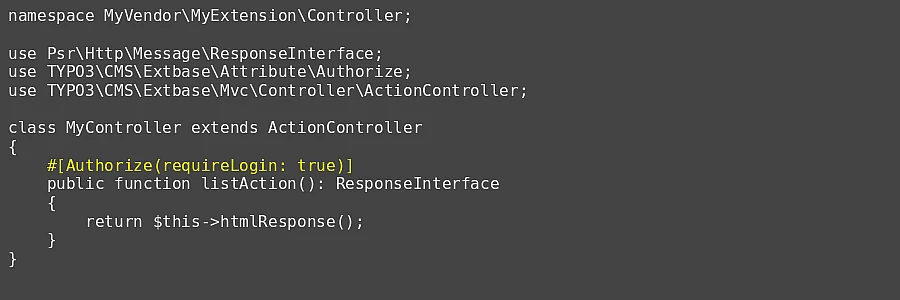
As illustrated in the example, you can easily enforce requirements such as a logged-in frontend user. Beyond that, developers can validate user group membership, plug in custom authorization logic, combine multiple checks, and tailor response messages to fit specific use cases.
Another important enhancement targets request handling for Extbase controller actions. With the new #[RateLimit] attribute, developers can restrict how frequently a user can access a specific action within a defined time frame. The implementation relies on the client’s IP address and leverages Symfony’s RateLimiter component backed by the TYPO3 caching framework.
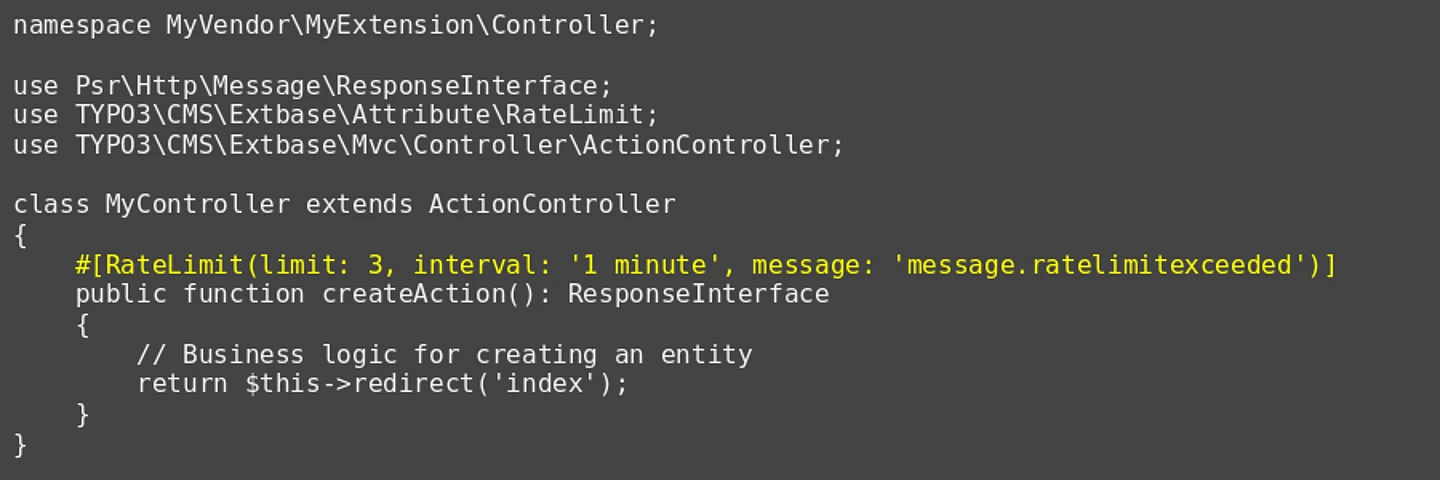
In practice, this provides an effective safeguard for sensitive endpoints such as form submissions, authentication flows, or resource-intensive APIs, helping to mitigate abuse and reduce the risk of brute-force attacks.
System Requirements, Support, and Maintenance
TYPO3 v14 requires at least PHP version 8.2 which will receive security updates until 31 December 2026. TYPO3 v14 also supports PHP versions 8.3, 8.4, and even the latest 8.5, paving the way far into the future.
We will support each TYPO3 sprint release (v14.0 to v14.2) until the next minor version is published. The long-term support version TYPO3 v14 LTS (aka version 14.3) will receive bug fixes until 31 December 2027, and we will provide security patches for TYPO3 v14 LTS until 30 June 2029.
Read more about the requirements and dependencies on get.typo3.org.
Download and Installation
You will find all the details about the release and how to download and install TYPO3 at get.typo3.org. Detailed installation instructions are documented in the Installation Guide. We recommend using Composer to set up your TYPO3 environment.
LTS-release Ahead!
TYPO3 version 14.2 marks the official feature freeze for the v14 release cycle. No additional features are planned ahead of the LTS release in April 2026. From this point on, the TYPO3 Core team and contributors shift their focus to testing, stabilising, and refining both the codebase and the user experience, while continuing to fine-tune recently introduced features.
For extension developers, this is an ideal time to review their extensions, run compatibility tests, and align the codebase with TYPO3 v14.
Keep an eye on upcoming release party announcements and community events. Around 21 April 2026, the TYPO3 community will come together with demos, talks, and celebrations, both online and in person, to mark the LTS release. As an organizer you can register your event by contacting Luisa from the TYPO3 GmbH. Read the article Join the TYPO3 v14 LTS Launch Festivities on 21 April 2026 for more details.
