Meet the TYPO3 Dev Companion: TYPO3 Knowledge for Your Coding Agent

Coding agents read a TYPO3 project well, but know TYPO3 badly. The TYPO3 Dev Companion fixes that: a small, local, read-only server that gives your agent version-bound TYPO3 knowledge, answers from your own installation, and step-by-step workflows for real TYPO3 tasks.

Open source, experimental, and installed with one command, the TYPO3 Dev Companion is an MCP server that gives coding agents TYPO3-specific knowledge bound to the version you are on.
- Answers with sources. It answers from curated documentation, the TYPO3 project's own services, and your live installation, and always states which source answered.
- Workflows, not just facts. It ships task skills: complete, step-by-step workflows for common TYPO3 developer tasks.
- Read-only and local. It stays local except for one path to official TYPO3 services, and is available now as an experimental 0.x release for testing.
Your Agent Reads Your Code Well. It Knows TYPO3 Badly.
If you have let a coding agent loose on a TYPO3 project, you know the moment. The code looks right, but it registers a plugin the way we did it before TYPO3 v11. Or it hands your v12 LTS project a convention that won’t be released until v15. Or it invents an icon identifier that sounds plausible, but that does not exist. Each mistake is small. Each one costs a review round, a red pipeline, or an hour of asking why the backend module does not show up.
The agent is not lacking intelligence. It is lacking TYPO3 expertise. Knowledge exists that would have prevented each of those mistakes. It is spread across docs.typo3.org, the Core Changelog, Forge, Gerrit, and the installation itself — and it differs between each of the TYPO3 versions your team supports.
Nobody carries all of that in their head. An agent that goes looking for it pays for every turn the search takes, and it still guesses in the end.
A Local Server That Answers TYPO3 Questions
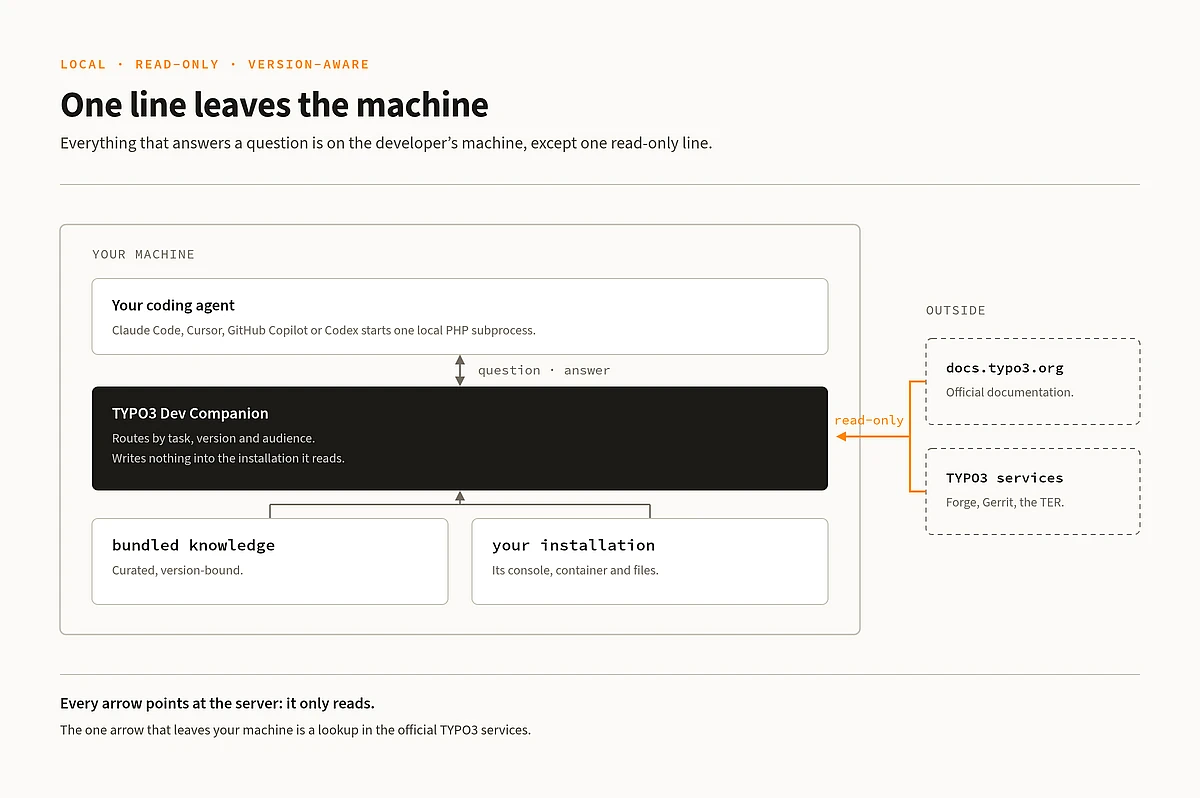
The TYPO3 Dev Companion is an MCP server written in plain PHP. Your agent's client, whether that is Claude Code, Cursor, GitHub Copilot, Codex, or another MCP-capable tool, starts it as a local subprocess and asks it questions while it works. There is nothing to host, no port to open, and no account to create.
It gives the agent three things:
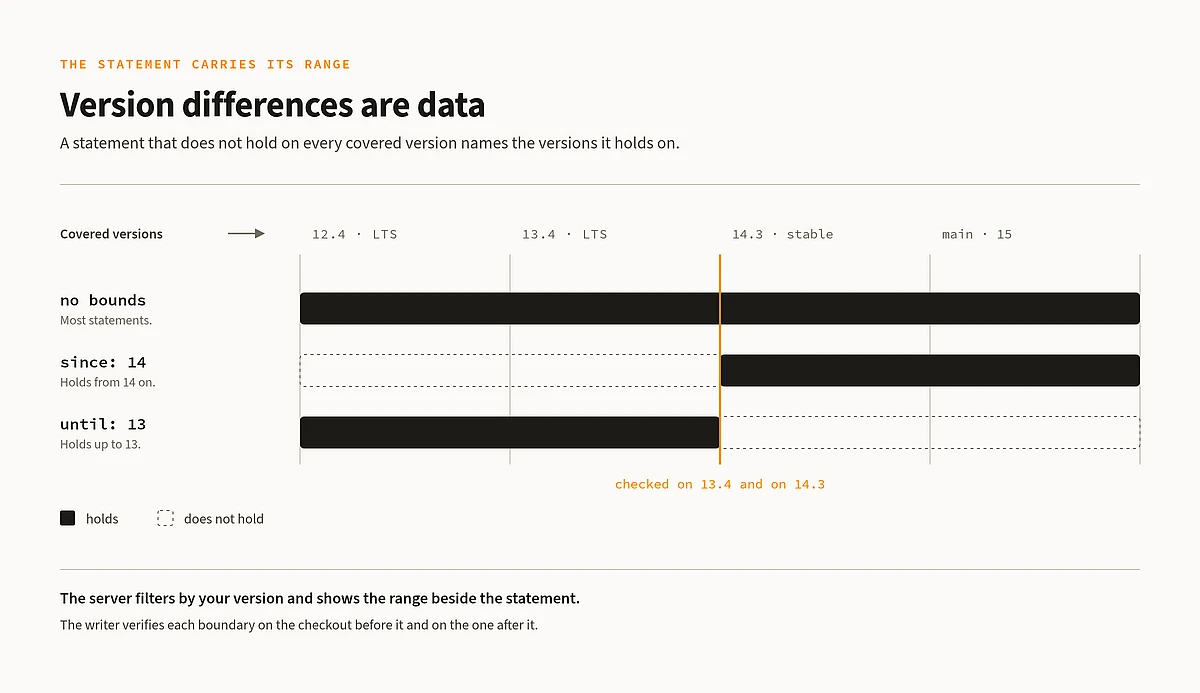
- TYPO3 knowledge bound to versions. The conventions a change has to follow, for TYPO3 12.4, 13.4, 14.3, and main. Every statement names the versions it holds for, so an LTS project is never handed a rule that only the development line has.
- Answers from your own installation. Which icons, labels, and backend modules are actually registered. What a configuration value is after every extension has had its say. Which packages the project has and what each of them registers.
- Workflows for whole tasks. Not just facts, but the order to do things in: developing a backend module, reviewing a patch, testing an extension, and upgrading to the next TYPO3 major version.
What that buys is a ceiling on what a TYPO3 question costs. A lookup that would otherwise take a handful of turns, at whatever price the search happens to cost, arrives in one call at a price that varies little. The project is honest about the other half: nobody has yet measured whether the answers make an agent more correct. That measurement is part of what the project is set up to produce.

Every Answer Says Where It Came From
Behind the server sit three kinds of sources, and the agent is told which one answered.
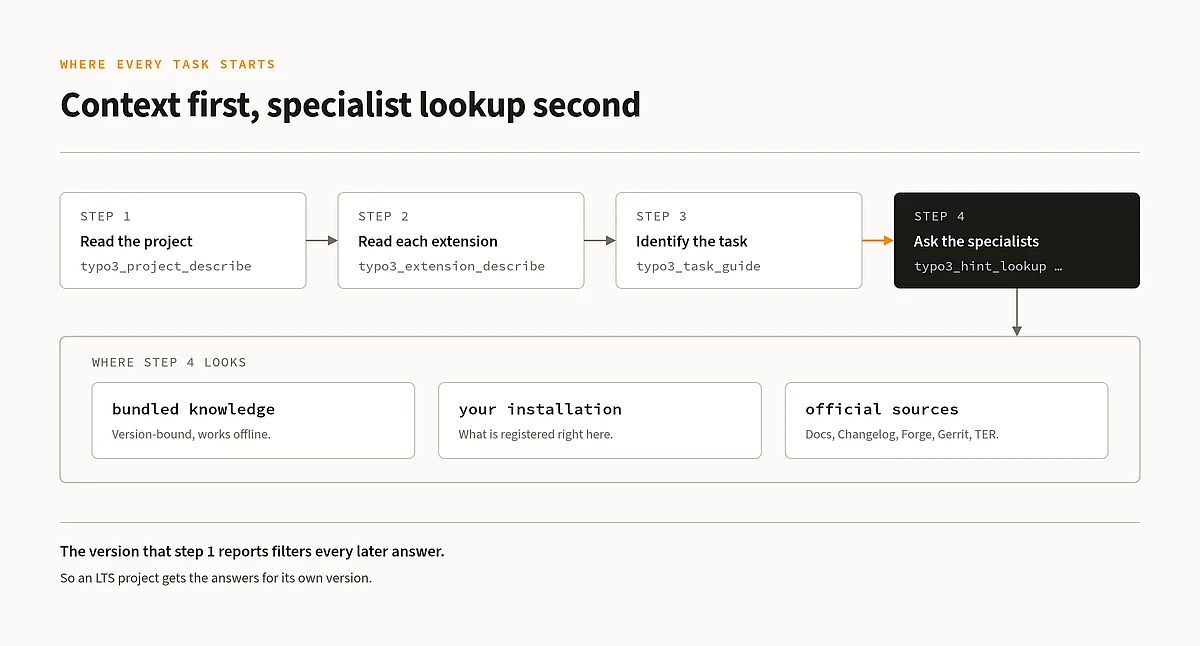
1. What the Server Already Knows
Most answers come from knowledge that ships with the server: curated, version-bound descriptions of how things are done in TYPO3, from TCA and dependency injection to site sets, content elements, Extbase, testing, and the core's own contribution rules. It doesn’t require a working TYPO3 installation. This matters more than it sounds, because much TYPO3 work happens in a broken state where nothing runs — in a project that does not exist yet, in an upgrade that left the site unbootable, or in a core checkout with no database.
2. Official Knowledge From the TYPO3 Project
Some questions are answered live by the TYPO3 project's own sources. Broad API questions are searched in the official documentation for the release you asked about. Forge and Gerrit are read so the agent can tell in one call whether an issue is already fixed or a patch is already under review. The Changelog answers what the version broke, deprecated, or added, and the Extension Repository answers what is already published under an extension key.
3. Knowledge From Your Own Installation
And some questions have no answer anyone could know, because they depend on your installation: which labels exist, which icons are registered, and what a flex form field resolves to. For those, the server finds the installation you are working in and asks it directly, through its own console or by booting it in a subprocess and querying its container. Where the installation is broken, it reads the packages from disk instead, and says so, together with what that leaves out.
It Knows Which TYPO3 Version You Are On
Most teams support more than one TYPO3 version at the same time, and most mistakes an agent makes about TYPO3 are version mistakes. So the server treats version differences as data, rather than as prose. A statement that does not hold on every covered version carries the range it holds for. The server filters by the version you are on and shows the applicable range beside the statement. Every boundary has been verified against real core checkouts, comparing both sides, before it was written down.
Workflows, Not Just Facts
Knowing the rules does not tell an agent in which order to apply them. So the Dev Companion installer also publishes task skills into your project: complete, step-by-step workflows for one kind of task each, calling the server where they need it.
For core contributors, there are skills for triaging an issue, checking out a patch under review, developing a patch and carrying it to Gerrit, and reviewing somebody else's patch set.
For extension and site work, there are skills for building a backend module or a content element, checking the health of a whole package, reviewing an incoming change, setting up tests and the asset build, writing the documentation, getting a local development installation running, and moving a package to the next TYPO3 major.
Every skill opens the same way: establish which project and which TYPO3 version you are in before changing anything.
Nothing Leaves Your Machine. Nothing Is Written.
For anyone who has to sign off on a tool like this, the boundaries matter as much as the features, so here they are:
- It reads. Nothing is written into the TYPO3 installation it is pointed at.
- It doesn’t start anything. A lookup never starts a container or a service as a side effect. A stopped DDEV project is reported together with the command that would start it.
- It stays local. Exactly one read-only path leaves the developer's machine: to the official TYPO3 documentation and the TYPO3 project's own public services. No third party sees your code.
- It does not replace judgment. An answer describes what is present in an installation without treating it as correct. Code found there is not repeated as a pattern merely because it runs.
The server states these boundaries itself when a client connects, so the agent works under them too.
For Site Developers, Extension Authors, and Core Contributors
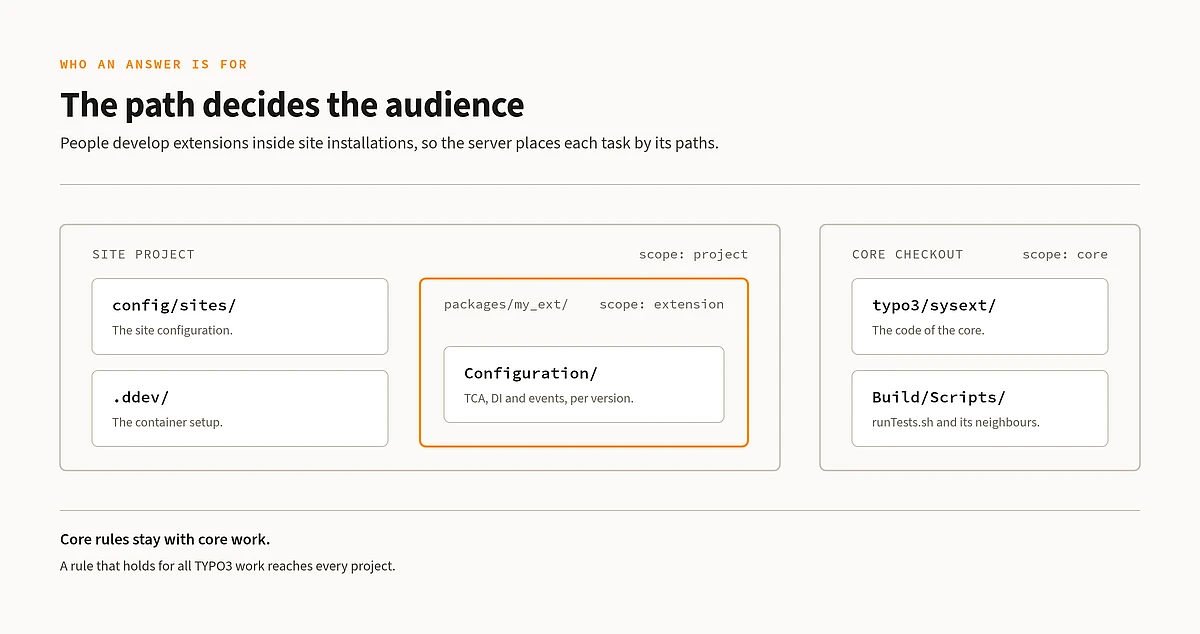
Three kinds of people do TYPO3 work: the site developer, the extension author, and the core contributor. The same person often combines two roles in one checkout, because extensions are developed inside site installations. The Dev Companion serves all three deliberately. Every answer says which kind of role it is for, so a site project is never handed a rule that only applies to the core, and a core patch is never held to a sitepackage convention.
Getting Started
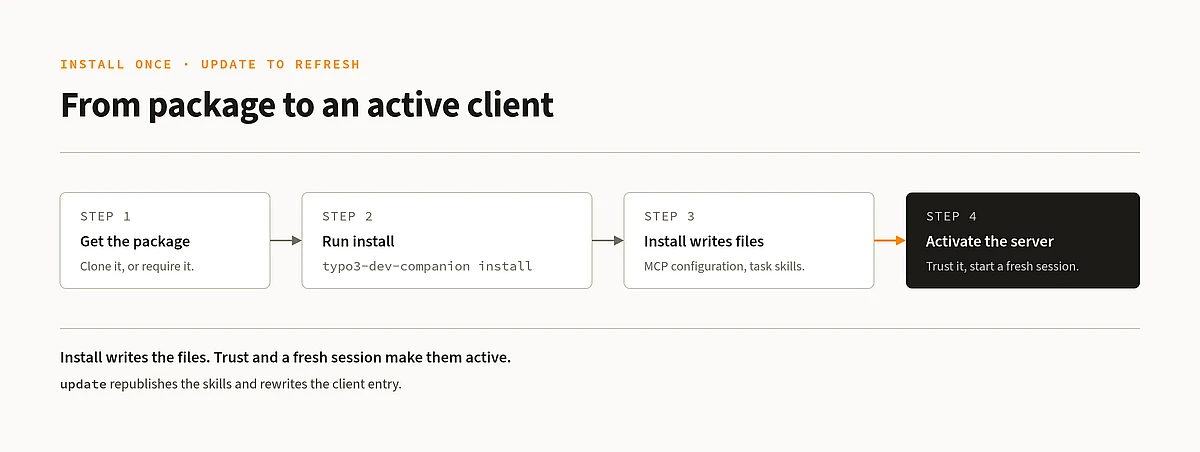
You need PHP 8.2 or later and Composer. The package works as a standalone checkout or as a Composer dependency of your project.
The install writes the server into your project's MCP configuration and publishes the task skills into the place MCP clients look for them. Trust the server in your client, start a fresh session, ask it something TYPO3-specific, and watch it call the server before it guesses.
Experimental, and Built by Being Used
This is a 0.x package: tool names and answer shapes can still change. If you depend on it, pin a commit.
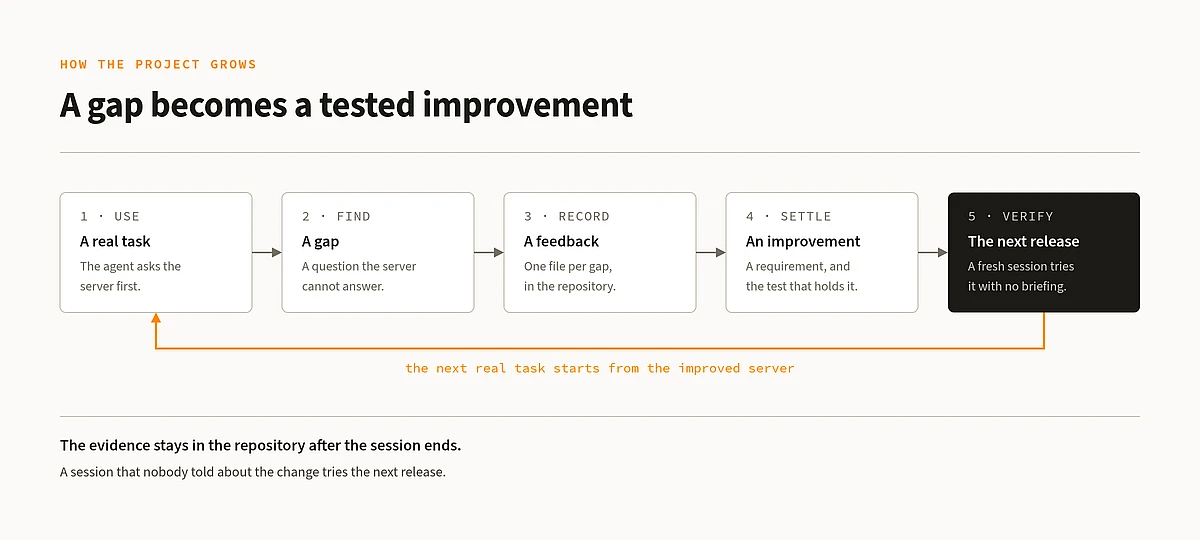
What makes the project different is how it grows. An agent gets a real task in a real checkout and works under one rule: whatever it would otherwise search for, it asks the server first. Where the server has no answer, the agent solves the task on its own and hands the answer back at the end of the session, mentioning the question that exposed the gap. That gap is written down in the repository, either as a requirement with a test that holds it or as a decision that records what the change rested on. The next release is then tried again by a session that was never told about the change.
This feedback loop also shapes what gets built next. The gaps that remain today are mostly questions has asked yet. So the fastest way to make it better is to use it: point it at your project, give your agent a real task, and let it report what it could not find.
Try it against a real project and tell us what happened: does it work for you, and how well? Open a GitHub issue for anything the server got wrong, could not answer, or should cover next.