
Changing the Playing Field — Visual Editing in TYPO3 v14
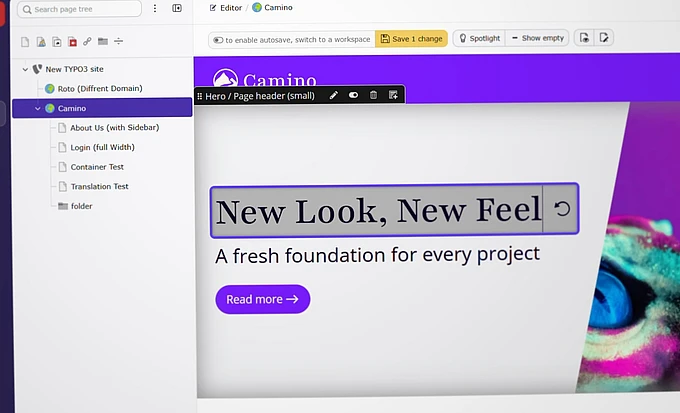
Last weekend at Web Camp Venlo, developer Matthias Vogel demonstrated how the default Camino theme supports visual editing in TYPO3 v14. I believe this is a quantum leap for our CMS, both in terms of usability and for its appeal to potential clients.

Sometimes, closing a sale is simply a matter of easing the customer’s tension and showing them how effortless the solution can be. In TYPO3, one of those magic tricks is visual editing. Having been the maintainer of the Frontend Editing (frontend_editing) extension for TYPO3, I know this from experience.
I also saw the challenges and what limited that extension’s success. For Frontend Editing to work, integrators had to add a custom Fluid view helper every time a template rendered a field value. To make matters worse, uninstalling the extension required removing those custom view helpers again, or the website would break.
With the new Camino theme and two new Fluid view helpers, TYPO3 v14 changes the playing field. Visual editing will be supported by the core.
Take a look at the video to see the Visual Editing extension in use:
Data Context as Plug-and-Play
On the stage in the Netherlands, Matthias Vogel demonstrated what is now possible. After nearly five months of almost full-time work, his new extension enables editors to modify content directly within the page’s actual design. True WYSIWYG inline editing powered by modern JavaScript.
“The shadow DOM in the browser is the front-end magic and TYPO3’s Record objects make it simple to integrate,” Matthias explains. “The Record object contains all the information you need about the context of the field you want to edit.”
It may sound simple, but the implications are significant. With help from core component merger Simon Praetorius, TYPO3’s Fluid templates can now expose far more contextual information when a field is rendered in the frontend. As AIs benefit from structured and semantic data, this could open the door to much more than just visual editing.

Bound for the Core
Core Team Lead Benni Mack has thrown his support behind Matthias’s extension, which is now available in the FriendsOfTYPO3 namespace. This is the home of trusted community initiatives reserved for "reliable extensions for TYPO3”, such as Content Blocks (content_blocks). Visual Editing is set to follow a similar path, as a close-to-core, rapid-development project.
“My plan for the extension is to integrate it with TYPO3 as fast as possible,” says Matthias. “Not to rush it, but to work towards that goal.” If the community embraces the initiative, he aims to make visual editing a core feature already in TYPO3 v15.
The initiative is looking for additional maintainers. If you’re interested in contributing, don’t hesitate to get involved.
Adding Visual Editing to Your Site
With the release of TYPO3 v14.2 at the end of this month, both Camino and Fluid Styled Content will have support for visual editing after installing the extension with composer require friendsoftypo3/visual-editor (or using the Extension Manager).
Adding visual editing to your custom templates or extensions is pretty straightforward. You only need to make small adjustments to your template, using two new Fluid view helpers. These trigger new PSR-14 events that the Visual Editor listens for. With a few extra steps, you can also use it with TYPO3 v13.
It’s all explained in detail in the readme file and the v14.2 Changelog entries, but here’s a quick introduction.
f:render.text
If {record} is a Record object, just change …
<h1>{record.header}</h1>Into …
<h1>{record -> f:render.text(field: 'header')}</h1>f:render.contentArea
In TYPO3 v14, this view helper is the recommended way to render content areas. What used to be …
<f:cObject typoscriptObjectPath="lib.dynamicContent" data="{colPos: '3'}"/>Can now be written as …
<f:render.contentArea contentArea="{content.main}" />Great First Steps on a Grand Journey
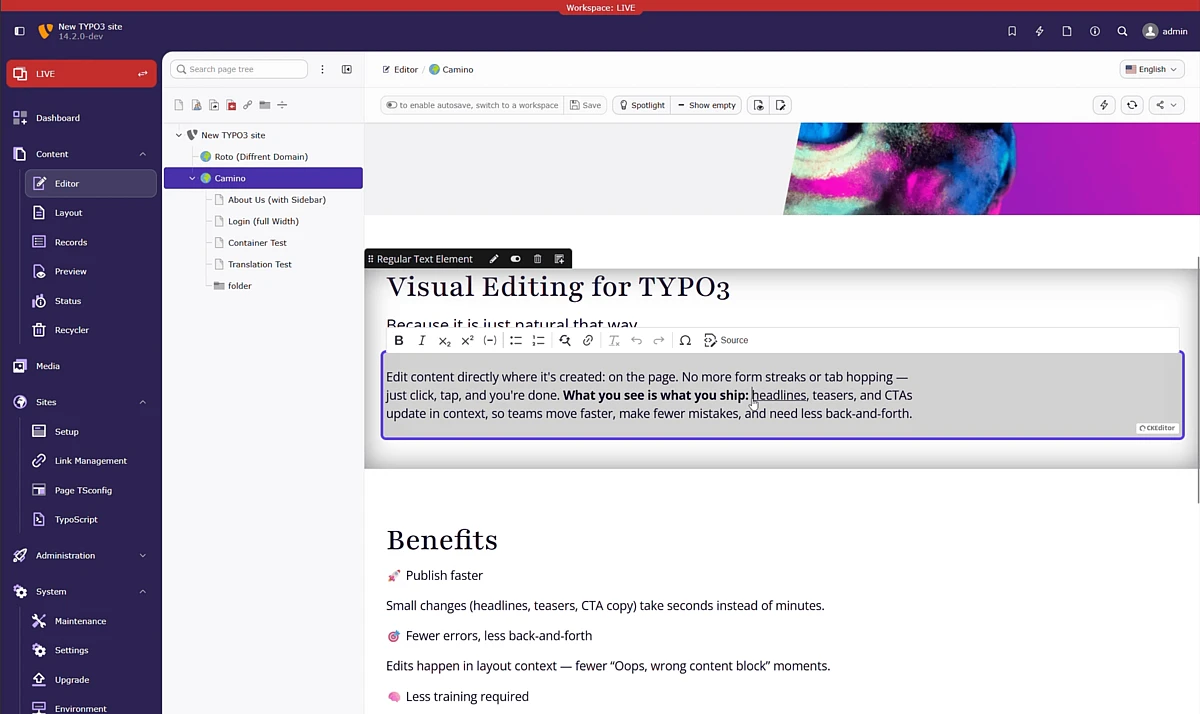
The Visual Editor already supports basic functionality and introduces some cool UI features. It supports both plain text and rich text editing, and allows editors to reorder content elements using drag and drop. Editable fields can be highlighted, and changes are stored in the browser until you click the save button — unless you enable autosave. A tight integration with TYPO3’s APIs ensures that backend user permissions are validated for every field.
A personal reason why I love this way of editing is how easy it makes quick edits. Everything on the page is visible to you, and you can just click and edit. Gone are the days of repeatedly opening and closing individual content elements.
Of course, there is still work to be done, and no first iteration can cover every possible feature. However, with Camino available as a core feature, TYPO3 has a standardized, best-practice testing environment that allows development to move forward quickly and reliably.
For custom implementations, it is still conceivable that the editor’s JavaScript and CSS can interfere with site-specific code. However, this risk is far smaller than it was before.
An Investment in TYPO3’s Future
For me, this project is a great example of where our CMS can go, given the right kind of investment, willpower, and collaboration. Matthias has taken on an important role in developing a long-awaited feature, and his employer, anders und sehr, has allowed their technical lead to devote significant work time to open source contributions that benefit the TYPO3 community as a whole.
This is a great inspiration to me. I hope it inspires you too!