
TYPO3 and its Accessibility in the Backend — Changes from v6 to v14
A look at how the TYPO3 community has tackled backend accessibility over the years — and what a dedicated sprint in 2025 revealed about how far it's come, and how far it still has to go.

What Has Happened So Far
We — a group of dedicated testers and part of the TYPO3 community — have made it our mission to examine the TYPO3 backend from the perspective of accessibility. We want to pave the way for all users who want to work with TYPO3 as editors or authors to have the most accessible user experience possible.
We have worked with blind testers, TYPO3 newbies, users with attention disorders, accessibility consultants, testers, developers and TYPO3 Core engineers, basing our test environments on different devices, browser versions, screen readers and other assistive technologies.
In short: The TYPO3 backend still has a lot of potential for accessibility, but it is already doing a lot of things right. With every TYPO3 version since v6, the backend has improved enormously in terms of accessibility.
The TYPO3 Accessibility Sprint 2025
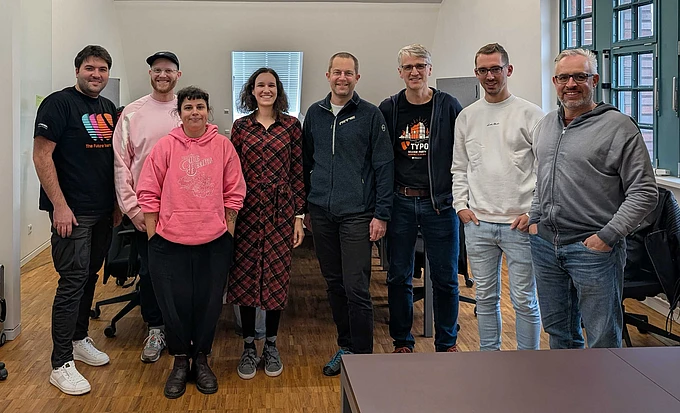
In October 2025, in the run-up to TYPO3 Camp Berlin, the TYPO3 Accessibility Sprint took place. Once again, a colorful group of 12 people from different backgrounds came together to identify, document and remove barriers in the TYPO3 backend. The goal: Create an inclusive user experience of TYPO3 from the perspective of authors.
“I liked the interdisciplinary approach very much, which was really very inspiring. I learned a lot about a systemic approach on accessibility testing during these days.”
— Markus Timtner, participant
In order to use the limited time during the sprint days meaningful, we wanted to address the most pressing barriers. We defined our test environments, one on macOS and a second one on Windows, as well as ten backend user flows. All user flows were tested using 31 selected WCAG 2.2 test steps. Mobile testing was not performed.
Read more about the technical and methodological details from the TYPO3 Accessibility Sprint 2025 at the end of this article.
Test Environment
- TYPO3 v14
- Operating system: MacOS 15.6.1, Windows 11 24H2
- Hardware: Macbook Pro, Lenovo laptop, Dell laptop
- Browser: Mozilla Firefox, Google Chrome, Safari
- Screen reader: NVDA, VoiceOver, JAWS
We clustered the barriers we found, converted them into tickets using a standard template and fed them into TYPO3 Forge under the tags accessibility and tas2025. Existing issues in the accessibility category were also reviewed during the sprint, updated or closed as necessary and merged with the new tickets.
Ticket Template
- Title, Description
- Prioritization: must/should/could have
- Tags accessibility, tas2025
- Reproduction steps
- Impact, Target group
- Severity, Frequency
- Screencast/Screenshot
- Definition of Done
- Recommended solution
- WCAG Reference
Results
During the sprint, 21 tickets were created. Below, we briefly present some user flows and their test results.
Successful Login
To start off, we checked whether users could successfully log in to the TYPO3 backend and receive meaningful error messages in case of incorrect entries.
The following barriers were found:
- The message informing users of incorrect entries is not read aloud by screen readers (fixed).
- The fields for entering the username and password do not provide labels (fixed).
- The target size of the links under More about TYPO3 is insufficient (fixed).
- The focus on the login button is not sufficiently visible: A uniform solution for the focus visibility of all labels in the TYPO3 backend should be sought here.
Edit, Save, and Delete a Content Element
We tested whether users could edit, save, and/or delete an existing content element.
- Some screen readers read the names of the buttons twice.
- Screen reader users do not receive feedback on character limits in form fields. The display also changes from green to yellow to red, and editing is terminated when the character limit is reached. These color changes should also be specified as text representation for screen readers.
- When saving changes to an existing content element, screen reader users do not receive feedback on the status of the action.
- The tooltip/title for the icon buttons is only displayed when hovering and not when focusing with the keyboard.
Create New Page and New Content Element
We ran backend user flows to check the creation of a new page or a new content element. Two issues were reported in the GitHub Bootstrap package concerning alternative texts for standalone icons. In addition, the insufficient keyboard usability in the file picker in the TYPO3 backend was reproduced in an existing ticket.
Internal Search
The goal of this backend user workflow was to enable users to find existing content elements.
The following barriers were found:
- When using the search (>20 results), pagination buttons are not keyboard focusable. Non-visual or keyboard users can therefore not access all results.
- When using the keyboard to operate the modal, focus leaves the modal after the last element. Non-visual users can lose orientation at this point.
- When entering a search request, users are not notified if and how many results are available.
What Still Needs To Be Done
Of the 21 barriers identified, seven were successfully removed by December 2025, and six are currently under review.
A comparison with our analysis in previous years (2023 and 2024) shows that many relevant actions in the backend can be performed without barriers. Compared to previous versions, most control elements in the TYPO3 backend in v14 are labeled, and graphics that do not carry information are hidden from screen reader users. Keyboard accessibility with various browsers and screen readers has also improved significantly.
The search function still has potential for improvement, as do special elements such as forms and the date picker. It is also important to continue working on the announcement of context changes, to ensure that users are informed about such status messages.
Where To Find Us
The TYPO3 Accessibility Team welcomes your participation during our regular Accessibility Hours and your support in improving the accessibility of the TYPO3 backend.
You can contact us in the #accessibility channel on TYPO3 Slack. That is also where we meet on the fourth Monday of the month at 16:00 (Central European Time) to discuss accessibility topics in the TYPO3 Accessibility Hour.
Further Reading
- 2023 — TYPO3 and its Accessibility in the Backend
- 2023 — t3n.de: TYPO3: Is the backend accessible? (Content in German)
- 2024 — PDF: Accessibility in the TYPO3 Backend (Content in German)
Appendix:
Methodology, Test Design and Ticket Results of the TYPO3 Accessibility Sprint
This appendix expands on the TYPO3 Accessibility Sprint 2025 (TAS 2025) with technical and methodological details. It targets professionals interested in the systematic setup of accessibility testing, WCAG 2.2 implementation, and integration of findings into development workflows.
1. Objective of the Accessibility Sprint
The goal of the 2025 sprint was to analyze the TYPO3 backend from the perspective of editorial users. The evaluation was based on the WCAG 2.2 success criteria (Level AA), supported by selected checkpoints from the BIK BITV-Test.
The aim: identify real-world accessibility barriers, document them in a developer-friendly way, and contribute to the continuous improvement of TYPO3 backend usability.
2. Test Environment
Two primary desktop environments (macOS and Windows) were used, with additional mobile testing conducted on high-priority issues. Assistive technologies and browsers were chosen based on realistic editorial use cases.
Operating Systems and Hardware
- macOS 15.6.1
- Windows 11 (Pro and Enterprise editions, build 24H2 / 22631)
- Modern notebook hardware across platforms
Browsers and Assistive Technologies
| Platform | Browsers | Screen Readers |
|---|---|---|
| Windows | Firefox (v143), Chrome (v138) | NVDA (2025.3), JAWS (demo) |
| macOS | Chrome (v141.0.7390.77), Safari (optional) | VoiceOver |
| iOS | Safari | VoiceOver |
| Android | System browser / Chrome | TalkBack |
Mobile testing focused on iOS Safari + VoiceOver and Android Chrome + TalkBack. All high-priority findings were verified using at least one mobile screen reader.
3. Audit Scope: 31 Selected WCAG 2.2 Checkpoints
A defined set of 31 checkpoints was used, drawn from the BITV-Test framework and mapped to WCAG 2.2 success criteria. These checkpoints focused on:
- Semantic structure (headings, lists, tables)
- Perceivability (color contrast, focus visibility, responsive layout)
- Keyboard navigation and interaction
- Status messages and ARIA roles
- Form labeling and error handling
These criteria were applied consistently across test scenarios and documented using structured issue reports.
4. Tested Userflows
A total of 11 userflows were defined and tested, with a prioritization set in advance for realistic editorial tasks. These flows reflect typical backend operations and were rated based on impact and frequency.
| # | Userflow | Priority |
|---|---|---|
| 1 | Logging into the TYPO3 backend | High |
| 2 | Editing, saving, or deleting content elements | High |
| 3 | Creating a new page | High |
| 4 | Creating a new content element | High |
| 5 | Adding external video content | Medium |
| 6 | Creating table-based content | Medium |
| 7 | Using internal search | High |
| 8 | Creating and inserting forms | High |
| 9 | Comparing backend users | Low |
| 10 | Creating a backend user with access rights | Medium |
| 11 | Editing images and alternative text via Form Engine | High |
Userflows were evaluated using assistive tech and keyboard navigation, based on the 31 checkpoints. Medium and low-priority flows are scheduled for extended testing post-sprint.
5. Sprint Results: Barriers and Tickets
During the sprint, 21 new accessibility tickets were created, and several existing issues were verified or updated. Typical barriers included:
- Keyboard focus loss after module transitions
- Missing or duplicate screen reader output
- Lack of ARIA live regions or form feedback
- Inaccessible modal dialogues
- Insufficient touch targets and focus indicators
Tickets were filed in TYPO3 Forge with tags accessibility and tas2025, linked to TYPO3 version 14.
Selected Examples
| Userflow | Ticket ID | Barrier Description | Status |
|---|---|---|---|
| Login | 107717 | Error message not read by screen reader | Resolved |
| Login | 107722 | Target size of login link too small | Open |
| Edit Content | 107726 | No feedback after saving via screen reader | Resolved |
| Search | – | Pagination inaccessible via keyboard | Open |
| Forms | – | No error feedback for invalid fields | In review |
| Form Engine | – | Focus not managed when editing image alt text | Planned |
6. Ticket Template
Each ticket followed a standardized format to ensure clarity, reproducibility, and technical relevance. This structure enables efficient collaboration between testers, developers, and accessibility advocates.
Template Fields (Example)
- Title: Keyboard focus disappears after clicking Edit in page module
- Description: Focus jumps to a non-visible region after edit action
- Reproduction Steps:
- Navigate page tree via keyboard
- Select a page
- Press Enter on Edit
- Affected Users: Screen reader and keyboard-only users
- Severity: High — loss of orientation
- Frequency: Frequent — occurs in all edit cases
- Media: Optional screencast or screenshot
- Recommended Fix: Set focus to the first heading in edit view (via focus() or ARIA)
- WCAG Reference: 2.4.7 Focus Visible
- Priority Level: must have / should have / could have
High-priority issues were selectively tested on mobile devices in some areas, depending on assessment.
7. Summary and Outlook
The TYPO3 Accessibility Sprint 2025 demonstrates the value of structured, userflow-based accessibility testing. Critical backend functions were reviewed, documented, and partly resolved during the sprint.
Next steps:
- Define regression tests for known issues
- Expand mobile testing coverage
- Harmonize focus behavior across modal and dynamic components
- Continue review and discussion in the TYPO3 Accessibility Hour (TYPO3 Slack)
References and Resources
Additional article contributors: Michael Telgkamp and Sebastian Jansen
