
CMS World Premiere: Side-by-Side Multilingual Frontend Editing
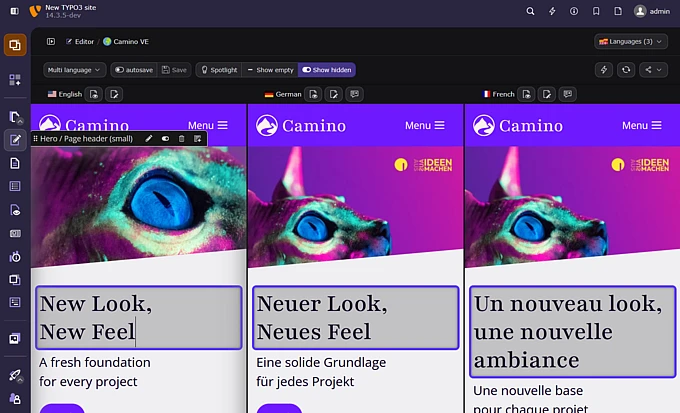
In this report, Matthias Vogel updates us on Visual Editor's progress, presenting version 1.8.0's new side-by-side multilingual editing.

With Visual Editor 1.8.0, TYPO3 introduces a new way to work with multilingual pages: Editors can compare and edit multiple language versions side by side, directly inside the rendered frontend.
Instead of switching between backend forms, previews, and language views, editors can stay in one visual workspace and work with the page as visitors will see it.
To the best of our knowledge, this is a world premiere for CMS editing: side-by-side language comparison and direct inline editing in the fully rendered frontend, combined in one workflow.
Multilingual Editing Is One of TYPO3’s Strengths — Now It Becomes More Visual
TYPO3 has always been a strong choice for complex multilingual websites, with structured content, languages, permissions, and long-term maintainability at its core.
But multilingual content work is not only about managing languages. It is about understanding context.
Editors need to compare translations, check whether a headline still fits, see if a call-to-action has the same meaning, and notice when different text lengths affect the layout. Until now, this often meant switching between views, language versions, backend forms, and previews.
Visual Editor 1.8.0 changes this workflow.
Editors can now open multiple language versions of a page side by side and work with them in one visual workspace. They see the page as it will appear to visitors and can directly edit content inside that rendered context. This catapults TYPO3 directly to the top tier of CMS platforms in this area.
A World Premiere for CMS Editing
The new multilingual editing workflow introduces a completely new way of working with translated pages in TYPO3.
Editors can:
- Compare multiple language versions of a page side by side
- Edit text directly inline in the rendered frontend
- Keep visual context while reviewing content, layout, and translations
This is especially powerful because the comparison happens inside the real page context. Editors do not just compare fields. They compare the actual page.
That makes a difference.
A translated headline may be longer, a teaser may wrap differently, or a button label may change the balance of a content element. With side-by-side multilingual editing, these differences become visible while editing, not later in the review process.
Imagine a campaign landing page in English and German. The English headline fits perfectly into one line, while the German translation wraps and pushes the call-to-action lower on the page. In a traditional workflow, this might only become visible during preview or review. With Visual Editor 1.8.0, editors can see and fix that difference while editing.
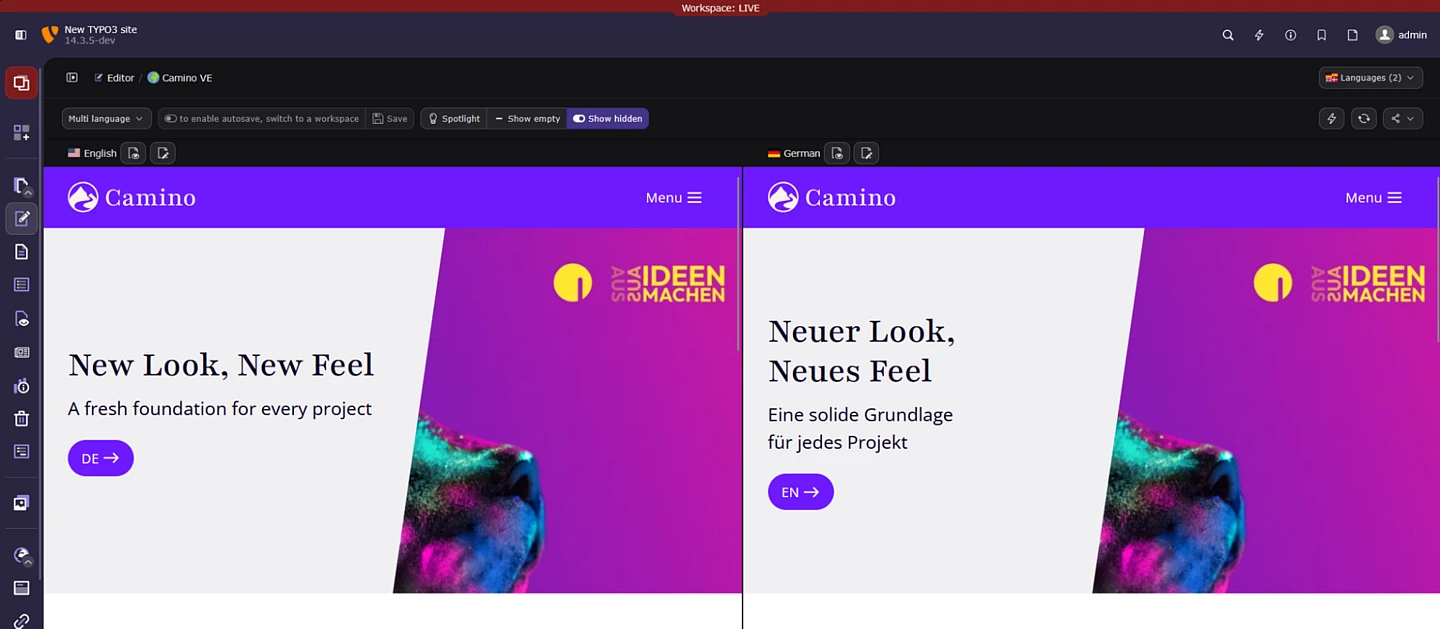
Community-Funded Progress for Everyday Editorial Work
This release is also an important story about the TYPO3 Community.
Visual Editor 1.8.0 is one of the first major visible results connected to the Community Budget Ideas 2026 Round Two initiative Improve EXT for Accessibility, Multilingual Editing, and Everyday Editorial Workflows.
The proposal aimed to make Visual Editor more useful, stable, and practical for real editorial teams, with a focus on accessibility, language comparison, full-screen mode, and hardening.
The proposal focused on four main areas:
- Accessibility
- Language Compare
- Full-Screen Mode
- Hardening
With version 1.8.0, the multilingual part of that vision becomes visible in a major way. The release brings side-by-side language editing directly into the Visual Editor and improves the surrounding workflow with better navigation, saving, loading feedback, and editor synchronization.
This is exactly the kind of progress that helps move a promising innovation toward everyday use.
This Matters for TYPO3
Editorial experience is one of the most visible parts of a CMS.
Developers may care about architecture, APIs, and long-term maintainability. Editors experience a CMS through the daily work of creating, changing, translating, and reviewing content. When that work feels clear and direct, the whole product feels stronger.
That is why this release matters.
Side-by-side multilingual frontend editing is not only a technical achievement. It is a signal for TYPO3’s future: complex content management and modern visual editing do belong together.
TYPO3 can be powerful and direct. Structured and visual. Enterprise-ready and editor-friendly.
Visual Editor 1.8.0 is a step in that direction.
Built for Real Multilingual Workflows
The new workflow is especially useful for teams that regularly work across languages.
For example:
- Reviewing translated landing pages
- Comparing localized campaign content
- Checking whether translations still fit the design
- Reducing preview and review loops
Instead of editing one language, saving, switching, previewing, and comparing manually, editors can stay in one workspace.
That can reduce friction in daily work and make multilingual editing feel more connected.
Thank You, TYPO3 Community
A huge thank you to the TYPO3 Community for making Visual Editor 1.8.0 possible through the Community Budget Ideas process.
Special thanks to the UX and Accessibility teams, everyone involved in the idea, and all who supported, tested, and gave feedback. Special thanks also go to anders und sehr GmbH, where the Visual Editor project was started and given the space to grow into a community-funded TYPO3 initiative.
Visual Editor shows what can happen when real needs, community support, and focused development come together.
Try Visual Editor 1.8.0
TYPO3 Visual Editor 1.8.0 is available now.
If you work on multilingual TYPO3 projects, this is a great moment to try the new workflow, test it with real content, and share feedback.
- Live demo
- Visual Editor 1.8.0 release notes
- Code on GitHub
- Community Budget Idea
- Join the discussion in the #ext-visual_editor channel on TYPO3 Slack
A New Chapter for Multilingual Editing
With Visual Editor 1.8.0, TYPO3 introduces a more visual and contextual way to work with multilingual pages.
It is a milestone for Visual Editor, a strong example of community-funded open source, and a practical improvement for everyday editorial work.
And that is exactly where great CMS experiences begin.
