
Bringing Fluid to VSCode
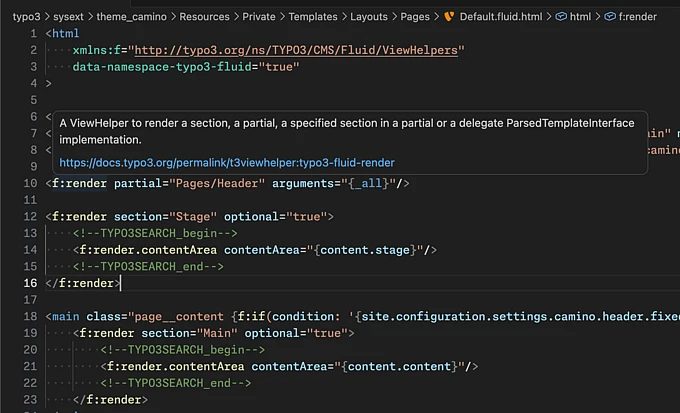
A first-party VSCode extension now provides deep integration for Fluid templates in the IDE, improving the developer experience for TYPO3 workflows.

Thanks to the recent Community Budget Idea focused on Fluid Developer Experience (DX), we are one step closer to making frontend developers feel right at home when working in TYPO3 projects. A new first-party extension, VSCode Extension for Fluid Templating Language, is now available under the trusted FriendsOfTYPO3 namespace. It provides deep integration for Fluid templates in popular code editors.
The extension has been tested not just with VSCode, but also with VSCodium, Cursor and Windsurf. It is available in Visual Studio Marketplace and in OpenVSX, covering a large part of the editor landscape apart from PhpStorm.
Solid Foundation
The extension provides advanced syntax highlighting for both Fluid HTML and Fluid Text templates. This includes recent syntax additions, such as CDATA blocks introduced with Fluid 5. Most importantly, your HTML editing experience remains fully intact: Built-in features for plain HTML and inline CSS and JavaScript, such as highlighting, autocompletion, snippets or inline documentation continue to work.
Speed Boost With Snippets
Carefully selected snippets for common Fluid tasks speed up your daily workflow. You won’t need to write <f:if condition=""> manually ever again, and your cursor will be right where you expect it. Feel free to suggest additional snippets or improvements in the GitHub project of the extension.
This first version also includes basic autocompletion and inline documentation for all built-in ViewHelpers in TYPO3. Support for custom ViewHelpers is planned for future versions.
Live Template Analysis
As a bonus feature, the extension can analyze Fluid templates by using the actual Fluid engine within the current project. When editing template files, you receive instant feedback about syntax errors and deprecated ViewHelpers.
For TYPO3 v14, this works out of the box with the new fluid:analyze CLI command. For TYPO3 v12 and v13, a small helper extension is required, which is automatically suggested within the editor.
Setup is designed to be straightforward: VSCode automatically locates the typo3 binary and honors DDEV if available. In most cases, no manual configuration is necessary, while advanced setups can still be configured globally or per project.
Part of a Larger Journey
Since joining the Fluid Maintainer Team in 2023, the focus has been on improving developer experience and productivity when working with Fluid. This is not only important for TYPO3 developers who are already familiar with the quirks of Fluid, but especially for TYPO3 newcomers from the frontend world.
In a competitive landscape, lowering technical entry barriers is key to attracting new developers and projects to TYPO3. This extension represents one step in that direction.
Download the extension from Visual Studio Marketplace or OpenVSX. Feedback, contributions, and real-world testing are highly encouraged. This is just the beginning.
