
Apache Solr for TYPO3: Boost the Performance and Accuracy of Your Website Search

Are you looking for a powerful, enterprise-ready search solution for your TYPO3 website? Apache Solr might be the answer you need.

Introduction
In B2B industries, companies often showcase a wide range of products, services, and technical documentation. Efficient search capabilities are crucial for enabling business clients to quickly locate product specifications, compare options, and make informed purchasing decisions.
Take the manufacturing industry, for example. Websites in this field often present extensive catalogs of industrial components, machinery, and materials. With such a diverse product range, a precise and user-friendly search tool is essential to help buyers find exactly what they need.
Conversely, long load times and irrelevant search results can deter potential buyers, driving them to your competitors.
Combining TYPO3 CMS and Apache Solr creates a powerful combination for delivering a first-class search experience on your website.
In this blog, we’ll explore the following:
- What is Apache Solr?
- Why should I use Apache Solr for my TYPO3 website?
- Apache Solr in Practice: Key Features
- The Future: Vector Search and AI-Powered Features
- Getting Started with Apache Solr
Let’s dive in!
What is Apache Solr?
Apache Solr is a proven open-source solution for enterprise search, designed to deliver more relevant search results in less time. It empowers users to find exactly what they are looking for quickly and effortlessly – whether it’s an industrial machine in an online catalog or technical documentation on your website.
Specifically, Apache Solr is an open, distributed search and analytics platform based on Apache Lucene. It enables full-text searches, making it ideal for handling large volumes of data. This solution can store, search, and analyze different types of structured and unstructured data promptly and efficiently – and provide highly accurate search results.
One reason for Apache Solr’s high performance is that it does not search for raw data and documents directly. Instead, it combines them into indices beforehand. These indices can be analyzed much more quickly, making the search significantly faster than a simple text search.
Apache Solr in the TYPO3 Ecosystem
Apache Solr has been a trusted solution in the TYPO3 ecosystem for over 15 years. The official apache-solr-for-typo3/solr extension (EXT:solr) is one of the most mature and widely used search extensions in the TYPO3 Extension Repository. It is actively maintained by dkd Internet Service GmbH with the help of the TYPO3 community and provides seamless integration with TYPO3 CMS.
Why Should I Use Apache Solr for My TYPO3 Website?
TYPO3 excels at managing complex structures and large amounts of content. However, efficiently searching through extensive content at scale is where Apache Solr truly shines. By integrating Apache Solr, you can significantly improve the search experience for TYPO3 users.

Below, we have summarized some of the most important benefits of a TYPO3 – Apache Solr integration:
Deliver Relevant Search Results Faster – Drive More Traffic and Engagement
Apache Solr enhances the search experience, improving user satisfaction, and driving more traffic to your website.
Apache Solr delivers real-time search results. Even on websites with vast amounts of data, users receive results within milliseconds. This is a significant improvement over TYPO3’s built-in Indexed Search, which can struggle with large datasets.
Additionally, Apache Solr uses advanced relevance algorithms to ensure the most relevant results appear first, helping users find exactly what they need quickly.
Apache Solr also offers user-friendly features such as:
- Faceted Search: Users can refine search results using various filters (e.g., category, product type, price range).
- Auto-Completion: The search bar suggests completion of search queries as users' type.
- Highlighting: Search terms are highlighted in results, making it easier to see relevance immediately.
- Spell Correction: Apache Solr can suggest corrections for misspelled search queries.
- Managed Resources: Use and management of synonyms and stop words
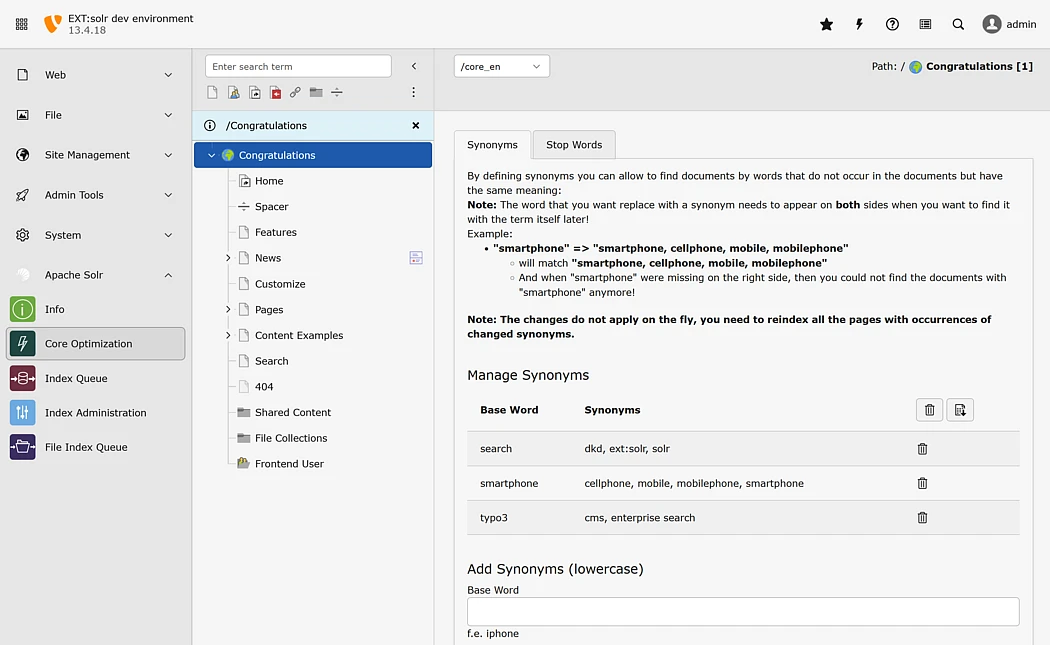
By integrating Apache Solr with your TYPO3 website, you provide visitors with a fast, accurate, and user-friendly search experience. This not only enhances user satisfaction but also increases website traffic and customer engagement.
Index Multiple Content Types – Create a Unified Search Experience
Apache Solr for TYPO3 is not limited to TYPO3 page content; it can index and search for information from various sources and content types.
For instance, a manufacturing company might have content across different systems:
- TYPO3 CMS for general website content
- Product databases with technical specifications
- PDF documentation and manuals
- News articles and blog posts
- Custom TYPO3 extensions (products, events, locations)
With Apache Solr for TYPO3, all this content can be accessed through one central search function. Users can search for product information, technical specifications, and documentation all in one place, with consistent results and filtering options.
In short, integrating Apache Solr with your TYPO3 CMS provides a consistent search experience and makes it easier to find relevant information across all your digital content.
Fine-Tune Relevance – Guide Users to What Matters Most
One of Apache Solr’s most powerful features is query boosting. This allows you to prioritize certain content types in search results based on your business needs.
Imagine searching for a person’s name that appears frequently in older news articles. At the same time, there is a current contact record with consultation hours and contact information. With a standard search, the old news articles might dominate results due to keyword frequency. With Apache Solr’s boost queries, you can push the current contact record to the top of the results.
This means you can:
- Prioritize product pages over blog posts
- Highlight current documentation over archived content
- Feature specific categories based on business goals
- Adjust relevance based on recency, importance, or other criteria
Practical Applications of Apache Solr in TYPO3 Projects
What Could the Use of Apache Solr for TYPO3 Look Like?
Imagine a machine manufacturer aiming to provide customers with detailed information about its extensive product portfolio. With Apache Solr for TYPO3, users can quickly and accurately find the right machine or spare part. The faceted search allows them to narrow down results by projects, blog posts, machine type, application area, price range, or technical specifications.
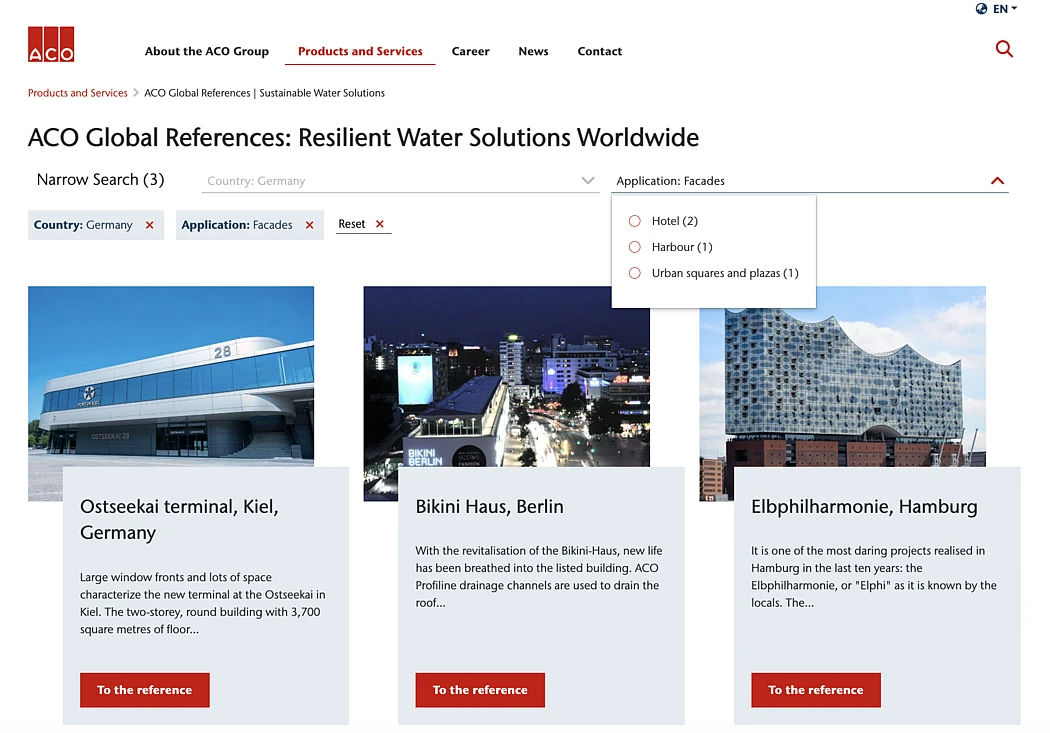
Additionally, Apache Solr for TYPO3 enables access to manuals, specification sheets, and maintenance instructions stored across different systems through one central search interface.
The use of Apache Solr within TYPO3 is wide-ranging. Here are a few more examples:
- A media company could help visitors quickly find specific articles across years of archived content.
- An e-commerce platform could enable customers to find products using advanced faceted filters.
- A documentation portal could provide developers with instant access to technical resources.
- An intranet could help employees find policies, contacts, and resources across multiple departments.
These examples show that the key factor for using Apache Solr is the amount and diversity of data a company manages, not necessarily the type of business or industry.
Key Features That Set Apache Solr Apart
Multilingual Support
Apache Solr provides native support for multiple languages with language-specific text analyzers. This is particularly valuable for international TYPO3 websites that need to provide search in multiple languages with proper stemming and stop-word handling for each language.
Scalability for Growing Needs
Apache Solr was built for enterprise requirements. Whether you have thousands or millions of documents, Apache Solr can scale to meet your needs. It supports distributed search across multiple servers for extremely large deployments, ensuring performance remains consistent as your content grows.
Flexible Configuration Through TypoScript
Configuration options can be managed through TypoScript and Site Configuration, providing flexibility for integrators and developers alike. The EXT:solr extension for TYPO3 provides extensive configuration options through TypoScript. You can fine-tune relevance rankings, configure which fields to search, set up custom analyzers, and much more – all without writing custom code. This makes it accessible for TYPO3 integrators while still offering the depth that developers need.
Active TYPO3 Community Support
With over 15 years of development and thousands of installations, Apache Solr for TYPO3 benefits from extensive community knowledge, regular updates, and comprehensive documentation. The extension is actively maintained, with regular compatibility updates for new TYPO3 versions.
The Future: Vector Search and AI-Powered Features
As search technology evolves, Apache Solr is keeping pace with modern developments. Recent versions of Apache Solr have introduced support for vector search capabilities, opening exciting new possibilities for TYPO3 websites.
Semantic Search with Vector Embeddings
Traditional keyword-based search relies on exact matches or variations of search terms. Vector search, however, enables semantic search – understanding the meaning and context behind queries rather than just matching keywords.
With vector search, Apache Solr can:
- Find conceptually similar content even when different terminology is used
- Understand user intent beyond literal keyword matches
- Deliver more relevant results for complex, natural language queries
- Support multilingual semantic search across different languages
For example, a user searching for “hydraulic power units” might also find relevant results about “fluid power systems” or “hydraulic drive mechanisms” without explicitly searching for those terms, because the semantic meaning is similar.
AI-Powered Conversational Interfaces
Building on top of Apache Solr’s search capabilities; organizations are now exploring conversational interfaces – enabling users to interact with website content through chat-like experiences.
These AI-powered features can:
- Answer Questions Naturally: Users can ask questions in natural language and receive direct answers extracted from your TYPO3 content.
- Provide Context-Aware Responses: The system can understand follow-up questions and maintain conversation context.
- Guide Users to Relevant Resources: Beyond simple answers, the interface can suggest related documentation, products, or pages.
- Reduce Support Load: Common questions can be answered automatically, freeing up support teams for complex inquiries.
Implementation Considerations
While these AI-powered features represent exciting possibilities, they require careful planning:
- Data Quality: Vector search and conversational AI work best with well-structured, high-quality content.
- Resource Requirements: Vector search requires additional storage for embeddings and more computational resources.
- Integration Complexity: Combining traditional search with AI features requires thoughtful architecture.
- Privacy and Compliance: When implementing conversational AI, consider data privacy regulations and user consent.
The TYPO3 and Apache Solr communities are actively exploring these capabilities, with early implementations already showing promising results. As these technologies mature, they offer TYPO3 websites the opportunity to provide increasingly sophisticated search experiences that go beyond traditional keyword matching.
Getting Started with Apache Solr for TYPO3
Technical Requirements
To run Apache Solr with TYPO3, you need:
- TYPO3: Version 13 LTS or higher recommended
- Apache Solr: Version 9.9.x recommended
- EXT:solr: Current version from the TYPO3 Extension Repository (TER)
- Server Resources: Dedicated or separate server for Solr in production environments
- Java: Apache Solr requires a Java Runtime Environment (JRE)
Many TYPO3 hosting providers offer Apache Solr as an additional service. Alternatively, you can run Solr in a Docker container... for both development and production environments.
Implementation Approach
Implementing Apache Solr follows a straightforward process:
- Planning: Define what content should be searchable and identify the features your users need most.
- Setup: Install Apache Solr and the EXT:solr extension from the TYPO3 Extension Repository.
- Configuration: Configure indexing settings, search fields, and relevance parameters through TypoScript.
- Indexing: Index your content, including pages, extensions, and files.
- Testing: Test search functionality with real user queries and refine configurations based on results.
- Launch: Deploy to production and monitor performance and user behavior.
The EXT:solr extension comes with sensible defaults, making it possible to get a basic search running quickly. From there, you can gradually add more sophisticated features like faceted search, auto-completion, and custom relevance tuning based on your specific requirements.
Best Practices for Success
When implementing Apache Solr for TYPO3, consider these best practices:
- Start Simple: Begin with basic full-text search, then gradually add features as you understand user needs.
- Monitor Search Queries: Track what users search for to identify content gaps and optimize relevance.
- Use Faceted Search Wisely: Only add facets that genuinely help users narrow results. Too many options can be overwhelming.
- Test with Real Content: Use production-like data volumes during testing to ensure performance meets expectations.
- Plan for Growth: Consider future content growth when planning server resources and index structure.
Conclusion
Apache Solr for TYPO3 provides TYPO3 projects with a professional, scalable, and powerful search solution. The combination of TYPO3’s flexibility and Apache Solr’s advanced search features enables the creation of first-class search experiences even for complex enterprise requirements.
The investment in a powerful search pays off: users find what they are looking for faster; satisfaction increases, and ultimately this leads to better conversion rates and improved business outcomes.
Whether e-commerce, documentation portal, intranet, or content-rich website – Apache Solr for TYPO3 is a proven solution for enterprise search requirements. With emerging capabilities like vector search and AI-powered conversational interfaces, Apache Solr continues to evolve, ensuring your search solution remains cutting-edge.
Key benefits:
- Precise and Powerful Search: Apache Solr delivers accurate and efficient search results, even with large data volumes.
- Advanced Features: Faceted search, highlighting, auto-completion, and spell correction enhance user experience.
- Proven Integration: The official EXT:solr extension provides seamless, well-maintained integration with TYPO3.
- High Scalability: Apache Solr grows with your organization, making it a suitable long-term solution.
- Future-Ready: Support for vector search and AI-powered features keeps your search experience modern.
By leveraging Apache Solr, you can take your TYPO3 CMS search functionality to the next level and provide users with the search experience they expect from modern enterprise websites.
For continuous development and improvement, for Apache Solr for TYPO3 we are permanently looking for partners.
With your partnership, you contribute to developing Apache Solr for TYPO3" and help us support the latest TYPO3 and Apache Solr versions.
