---
title: "TYPO3-PSA-2019-010: Cross-Site Scripting Vulnerabilities in File Upload Handling"
url: "https://news.typo3.com/security/advisory/typo3-psa-2019-010"
description: It has been discovered that TYPO3 is susceptible to cross-site scripting.
image: "https://news.typo3.com/_assets/d1e01514e4c4a5b3147940fa2ec50682/Images/og-image-news.jpg"
date: 2026-06-11
modified: 2026-06-11
categories:
- "Developer & Technology"
- Public Service Announcement
---
# TYPO3-PSA-2019-010: Cross-Site Scripting Vulnerabilities in File Upload Handling
- [Developer & Technology](https://news.typo3.com/article/category/developer-technology)
- Security / [Public Service Announcement](https://news.typo3.com/article/category/security/public-service-announcement)
TYPO3-PSA-2019-010: Cross-Site Scripting Vulnerabilities in File Upload Handling
================================================================================
17 December 2019

It has been discovered that TYPO3 is susceptible to cross-site scripting.
- [Oliver Hader](https://news.typo3.com/article/author/oliver-hader)
- **Component Type:** TYPO3 CMS
- **Subcomponent:** File Upload Handling (ext:core, ext:filelist, ext:backend, ext:frontend)
- **Release Date:** December 17, 2019
- **Vulnerability Type:** Cross-Site Scripting
- **Affected Versions:** All
- **Severity:** medium
- **Suggested CVSS v3.1:** [AV:N/AC:L/PR:L/UI:R/S:C/C:L/I:L/A:N/E:F/RL:T/RC:C](https://nvd.nist.gov/vuln-metrics/cvss/v3-calculator?vector=AV:N/AC:L/PR:L/UI:R/S:C/C:L/I:L/A:N/E:F/RL:T/RC:C&version=3.1)
### Problem Description
TYPO3 allows to upload files either in the backend user interface as well as in custom developed extensions. To reduce the possibility to upload potential malicious code TYPO3 uses the *fileDenyPattern* to deny e.g. user submitted PHP scripts from being persisted. Besides that it is possible for any editor to upload file assets using the file module (*fileadmin*) or changing their avatar image shown in the TYPO3 backend.
Per default TYPO3 allows to upload and store *HTML* and *SVG* files as well using the mentioned functionalities. Custom extension implementations probably would also accept those files when only the *fileDenyPattern* is evaluated.
Since HTML and SVG files - which might contain executable JavaScript code per W3C standard - could be directly displayed in web clients, the whole web application is exposed to be vulnerable concerning Cross-Site Scripting. Currently the following scenarios are known - given an authenticated regular editor is able to upload files using the TYPO3 backend:
- directly target a potential victim to a known public resource in a URL, e.g. */fileadmin/malicious.svg* or */fileadmin/malicious.html*
- using the TypoScript content object “SVG” (implemented in class *ScalableVectorGraphicsContentObject*) having renderMode set to inline for SVG files (available since TYPO3 v9.0)
- custom implementations that directly output and render markup of HTML and SVG files
SVG files that are embedded using an * * tag are not vulnerable since potential scripts are not executed in these scenarios (see ). The icon API of TYPO3 is not scope of this announcement since SVG icons need to be registered using an individual implementation, which is not considered as user submitted content.
### Solution
The real solution to avoid user submitted content and Cross Site Scripting in HTML and SVG files is to disable the possibility to upload those files in general. The TYPO3 install tool provides according settings in *TYPO3\_CONF\_VARS/SYS* which shall not contain HTML and SVG file extensions anymore.
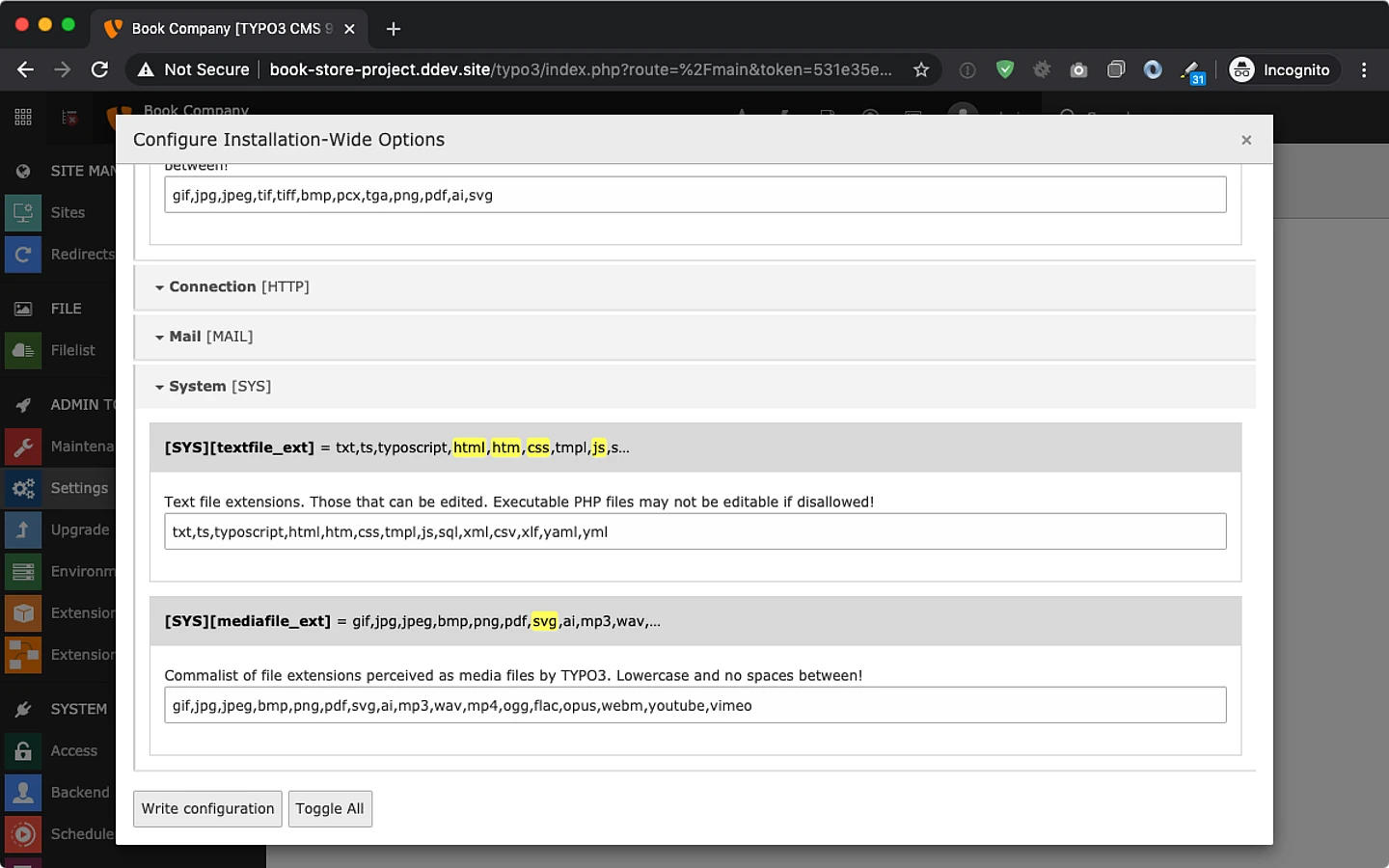
In case editors having access to the TYPO3 backend are not considered as “trustworthy”, administrators have to manually adjust their configuration in order to disallow using these file types in corresponding install tool settings:
- *TYPO3\_CONF\_VARS/SYS/imagefile\_ext* & *mediafile\_ext* (used to render “media” elements, basically using *
![]() * tag here)
- should not contain “svg”
- *TYPO3\_CONF\_VARS/SYS/textfile\_ext* (allows editors to create & edit files directly in the backend)
- should at least not contain “html”, “htm”, “js”, “css”, “svg”
- in case web server falls back to mime-type text/html for arbitrary file extension this setting should be empty
- *TYPO3\_CONF\_VARS/BE/fileDenyPattern* (used to deny uploads of those file extensions in the backend and in frontend applications using File Abstraction Layer API)
- might be extended with *html\|htm\|js\|css\|svg*
- (example: *\\.(php\[3-7\]?\|phpsh\|phtml\|pht\|phar\|shtml\|cgi\|html\|htm\|js\|css\|svg)(\\..\*)?$\|\\.pl$\|^\\.htaccess$* )
### Mitigation
While disabling HTML to be uploaded might be possible, disallowing SVG files might not be an option when being used as media assets. For this scenario the additional TYPO3 extension svg\_sanitizer has been implemented which makes use of the 3rd party composer package [enshrined/svg-sanitize](https://github.com/darylldoyle/svg-sanitizer). The scope of this extension is to sanitize and remove potential malicious code from SVG files when being uploaded which concerns the following scenarios:
- files being uploaded using the file module in the TYPO3 backend
- files being uploaded using any form view in the TYPO3 backend
- files being uploaded in custom implementation either using
- *ResourceFactory::addFile()*
- *ResourceFactory::replaceFile()*
- *DataHandler::checkValue\_group\_select\_file()*
- *GeneralUtility::upload\_copy\_move()*
- *GeneralUtility::upload\_to\_templfile()*
Besides that, the extension *svg\_sanitizer* is shipped with an upgrade wizard, which allows to sanitize existing SVG files which are persisted in file storages. This can be done by invoking its upgrade wizard using the TYPO3 install tool.
### Download
The extension *svg\_sanitizer* at least requires TYPO3 version 8.7.13 or 9.2.0 in order to make use of the mentioned hooks in class *GeneralUtility*. The extension can be obtained from the following sources:
- *composer require t3g/svg-sanitizer* ()
- [svg\_sanitizer](https://extensions.typo3.org/extension/svg_sanitizer) from TYPO3 extension repository
-
### Credits
Credits go to Mohamed Keffous and Nguyen Thanh Nguyen ([FortiGuard Labs](https://fortiguard.com/)) who reported the vulnerability concerning SVG files and to TYPO3 framework merger Frank Nägler for providing the additional *svg\_sanitizer* extension - the work time in order to achieve this has been sponsored by [TYPO3 GmbH](https://typo3.com/).
### General Advice
Follow the recommendations that are given in the [TYPO3 Security Guide](https://docs.typo3.org/typo3cms/CoreApiReference/Security/Index.html#security-guidelines). Please subscribe to the [typo3-announce](http://lists.typo3.org/cgi-bin/mailman/listinfo/typo3-announce) mailing list.

About the Author
[Oliver Hader](https://news.typo3.com/article/author/oliver-hader)
Core Developer at TYPO3 GmbH,Hof, Germany
[Website](https://typo3.com)[Twitter](https://twitter.com/ohader)[LinkedIn](https://www.linkedin.com/in/oliverhader/)[Xing](https://www.xing.com/profile/Oliver_Hader)
Oliver started to work with TYPO3 in 2005 and was fascinated by the product and its universe. Since 2007 he is member of the TYPO3 Core Team. After going back to university in 2014 for achieving a postgraduate master degree in internet web science, he is now researching on advanced web technology topics in general and for TYPO3 in particular.
In his spare time, Oliver loves to go cycling cross-country in the uplands around Hof (Germany) in northern Bavaria - at the region where he's living as well.
[More posts by this author](https://news.typo3.com/article/author/oliver-hader)